- Home Page /
- Electronics /
- Computer Accessories /
- Computer Accessories & Peripherals /
- Computer Hard Drive Accessories /
- Enclosures /
- MAIWO NVMe Cloner Duplicator, Dual Bay M.2 NV...
0 ratings





Item #:
206195169
MAIWO NVMe Cloner Duplicator, Dual Bay M.2 NVMe SSD Enclosure Reader, 20Gbps USB3.2 GEN2x2, Support M.2 PCIE NVME M Key SSD, Tool Free, All Aluminum
Item #:
206195169
XCD 148
Price Details
Excluding Shipping & Custom charges ( Shipping and custom charges will be calculated on checkout )
*All items will import from US
In stock
 Imported from USA store
QTY:
Order now and get it around Sunday, July 19
Secured transaction
Ubuy works hard to protect your security and privacy. Our advanced payment security system ensures confidentiality by encrypting your information during transmission using AES (Advanced Encryption Standards) and SSL (Secure Socket Layer) protocols. Your payment details are 100% secure as we do not share your payment details with third party sellers.
Our Top Logistics Partners


Experience blazing speed with our dual bay M.2 solid state drive cloner, featuring a 20Gbps USB-C port and one-key offline cloning for seamless data transfer.

Fast
Shipping

Free
Return*

Secure Packaging

100% Original Products

PCI DSS Compliance

ISO 27001 Certified


Note: Step Down Voltage Transformer required for using electronics products of US store (110-120). Recommended power converters Buy Now.


What Stands Out
Dual Bay Design
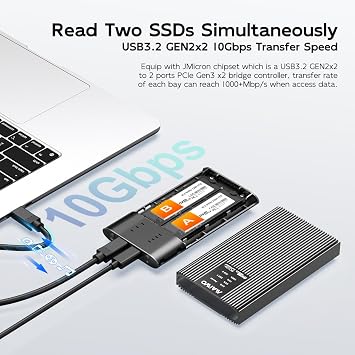
Simultaneously clone or access two NVMe SSDs, enhancing efficiency for data management and backups without the need for an extra docking station.
20Gbps Speed
Experience ultra-fast data transfer rates with USB 3.2 Gen 2x2 technology, ensuring rapid file access and backup for time-sensitive projects.
Tool-Free Setup
Easily install M.2 NVMe SSDs with a tool-free design, saving time and effort for both professionals and casual users seeking convenient storage solutions.
Product Details
- 【Compatibility】This dual bay hard drive cloner is compatible with M.2 PCIE NVMe and AHCI SSDs in size 2230/2242/2260/2280mm (DO NOT SUPPORT M.2 SATA SSD). Please note that the target slot supports only M.2 NVMe SSD, the source slot supports both M.2 NVMe and AHCI SSD.
- 【20Gbps USB-C Port】The 2 bay m.2 nvme copier comes with USB 3.2 Gen 2x2 interface, transfer rate can reach 2000MB/S (20Gbps), come with two USB cables (USB-C to USB-C cable and USB-C to USB-A cable).
- 【One-Key Offline Clone】This m.2 ssd to usb-c reader supports two drives read&write simultaneously and one-key offline clone. It also supports clone single disk of boot drive. There are clear LED Indicators for different working status. 【NOTE: If your drive is a new one, please do Hard Disk Initialization, Partition and Format to make the enclosure work. For specific steps, please see description.】
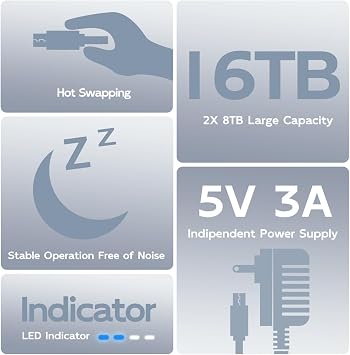
- 【Performance】Support TRIM / 16TB Capacity / Tool Free Installation / Hot Swapping / Plug and Play / Independent 5V 3A Power Supply / Excellent Heat Dissipation
- 【Wide Application】This M.2 external drive to usb adapter is compatible with Mac OS, Windows, Mac OS, Linux. And works with many devices such as Macbook Pro, Mac mini, Desktop, Laptop, PS4, PS5, Smart TV, Router, Smartphone (should support OTG), etc.
| Hardware Interface | USB 3.2 Gen 2×2, USB Type C |
| Hardware Platform | PC |
| Memory Storage Capacity | 16 TB |
| Compatible Devices | Desktop, Gaming Console, Macbook, Smartphone, Tablet |
| Hard Disk Form Factor | 2.5 Inches (6.4 cm) |
| Supported Devices Quantity | 1 |
| Data Transfer Rate | 20 Gigabits Per Second |
| Enclosure Material | Aluminum |
| Item Dimensions L x W x H | 4.72"L x 2.68"W x 0.66"H (12 x 6.8 x 1.7 cm) |
| Item Weight | 150 Grams |
| Brand | MAIWO |
| Global Trade Identification Number | 06921271226156 |
| Manufacturer | MAIWO |
| Mfr Part Number | K2022P K2022CL |
| Model Number | M.2 NVMe/AHCI |
| Built-In Media | 1x 5V 3A Power Adapter with USB-C Port, 1x Dual Bay M.2 NVMe/AHCI SSD Cloner, 1x USB-C to USB-A Data Cable, 1x USB-C to USB-C Data Cable, 1x User Manual |
| Product Dimensions (L x W x H) | 4.72"L x 2.68"W x 0.66"H (12 x 6.8 x 1.7 cm) |
| Material | Aluminum |
What's in the box
1x Dual Bay M.2 NVMe/AHCI SSD Cloner
1x USB-C to USB-C Data Cable
1x USB-C to USB-A Data Cable
1x 5V 3A Power Adapter with USB-C Port
1x User Manual
Who Should Buy?

-
Data Backup
Ideal for users needing quick and efficient data backup between NVMe SSDs without complex setups or additional tools.
-
Content Creators
Perfect for video editors and graphic designers who require fast read/write speeds for large files in their workflow.
-
IT Professionals
Beneficial for system administrators or technicians who need to quickly duplicate, clone or transfer SSD data during upgrades.

-
Casual Users
May not suit everyday users who rarely handle SSDs and require simpler plug-and-play external storage solutions.
-
Budget Buyers
Less ideal for individuals looking for inexpensive solutions, as this product targets higher performance at a higher price point.
-
HDD Users
Not suitable for users with traditional HDDs, as it is specifically designed for M.2 NVMe SSDs and compatibility issues may arise.
Product Description
Have any Query? Chat with us
Customer Questions & Answers
-
Question:
What is the maximum storage capacity of the MAIWO M.2 NVMe PCIe RAID Enclosure?
Answer: The MAIWO M.2 NVMe PCIe RAID Enclosure supports a maximum capacity of 16TB, utilizing its dual bay design. This allows you to install two M.2 NVMe PCIe SSDs at once. Users can choose to configure these SSDs in various RAID modes, enabling optimized performance or redundancy depending on specific needs, such as high-speed data access for video editing or secure data storage for backups. -
Question:
How does the RAID configuration work in the MAIWO enclosure?
Answer: The MAIWO enclosure allows for multiple RAID configurations, including RAID 0, 1, and JBOD modes. RAID 0 is designed for increased speed by striping data across both drives, which is ideal for applications that require fast data access. RAID 1, on the other hand, mirrors data for redundancy, making it suitable for safeguarding important files. JBOD allows each SSD to operate independently, maximizing overall capacity and flexibility for diverse storage needs. -
Question:
What are the connectivity options for the MAIWO M.2 NVMe PCIe RAID Enclosure?
Answer: This enclosure features a USB 3.2 Gen2x2 Type-C connection, supporting data transfer speeds of up to 20Gbps. This high-speed connectivity ensures that you can efficiently move large files or backup projects, making it ideal for professionals working with large datasets, high-definition videos, or extensive photo libraries. The Type-C interface also offers versatility with cable compatibility in modern devices. -
Question:
Is the MAIWO M.2 NVMe PCIe RAID Enclosure compatible with all operating systems?
Answer: Yes, the MAIWO M.2 NVMe PCIe RAID Enclosure is compatible with a wide range of operating systems, including Windows, macOS, and Linux. This broad compatibility ensures that it can be seamlessly integrated into various computer ecosystems, making it suitable for users from different backgrounds. Whether you're a creative professional, tech enthusiast, or casual user, this enclosure provides flexibility and convenience. -
Question:
Can I use the MAIWO enclosure for gaming purposes?
Answer: Absolutely! The MAIWO M.2 NVMe PCIe RAID Enclosure is an excellent choice for gaming enthusiasts who require fast load times and quick access to large game libraries. With its high data transfer speeds and the option for RAID 0 configuration, it can significantly enhance gaming performance, enabling faster game launches and smoother gameplay experiences. This makes it a perfect addition to any gaming setup. -
Question:
What type of SSDs are compatible with the MAIWO enclosure?
Answer: The MAIWO enclosure is designed for M.2 NVMe PCIe SSDs. It supports both PCIe Gen 3 and Gen 4 SSDs, expanding your options for high-performance storage. Users can take advantage of cutting-edge SSD technology to maximize data transfer speeds and overall system responsiveness. This feature is particularly advantageous for tasks such as video editing, data analysis, or running virtual machines. -
Question:
How is the cooling managed in the MAIWO M.2 NVMe PCIe RAID Enclosure?
Answer: The MAIWO RAID Enclosure incorporates intelligent cooling technology to manage heat, thus ensuring optimal performance. It includes built-in heat dissipation features to prevent overheating during intensive tasks, making it suitable for continuous operation. This is particularly important for high-performance applications like gaming or video rendering, where sustained data throughput generates increased heat. -
Question:
Can I use the MAIWO enclosure for data backup?
Answer: Yes, the MAIWO M.2 NVMe PCIe RAID Enclosure is an excellent solution for data backup. By utilizing RAID 1, users can create a redundant mirror of their important files, providing an extra layer of protection against data loss. This feature is essential for professionals needing to safeguard critical data, such as photographers backing up extensive photo collections or businesses managing sensitive client information. -
Question:
What accessories or components do I need to use the MAIWO enclosure?
Answer: To utilize the MAIWO M.2 NVMe PCIe RAID Enclosure, you will need two M.2 NVMe PCIe SSDs of your choice. Additionally, a USB Type-C cable is typically included, but ensure your device has a compatible USB 3.2 interface for best performance. No additional software is usually required, as the enclosure is generally plug-and-play. This simplicity enhances usability across different platforms. -
Question:
Where can I buy the MAIWO M.2 NVMe PCIe RAID Enclosure?
Answer: You can conveniently purchase the MAIWO M.2 NVMe PCIe RAID Enclosure from Ubuy in Grenada. Ubuy offers a straightforward online shopping experience with detailed product descriptions and user-friendly navigation, making it easier for you to find this high-performance storage solution.
MAIWO Enclosures M.2 NVMe/AHCI Editorial Review


No editorial reviews found
Customer Reviews & Ratings
56 customers ratings
-
5 Star
74%
-
4 Star
11%
-
3 Star
6%
-
2 Star
3%
-
1 Star
6%
Review this product
Share your thoughts with other customers
Platform Trust & Buyer Confidence

MT
Mohd
Verified buyer
“The product received very good packaging & safe…Thank You”
16 June 2026 · via Trustpilot
SJ
Shawati
Verified buyer
“Accurate delivery timing given”
16 June 2026 · via Trustpilot
YB
Youcef
Verified buyer
“Not madly expensive like I thought, and much quicker than promised.”
15 June 2026 · via Trustpilot
LM
Leila
Verified buyer
“Never dealt with Ubuy before, but everything worked out great. Seamless cross border purchasing and shipping. Thanks!”
6/7/2026 · via Trustpilot
KA
Kwame
Verified buyer
“The process was smooth, with clear communication and timelines. This was my 1st purchase and I am really impressed. I will definitely be coming back.”
12 June 2026 · via Trustpilot
Secure Checkout
Global Delivery
Easy Returns
Genuine Products
Product Price History
Important information
- Limitations : For products shipped internationally, please note that any manufacturer warranty may not be valid; manufacturer service options may not be available; product manuals, instructions, and safety warnings may not be in destination country languages; the products (and accompanying materials) may not be designed in accordance with destination country standards, specifications, and labeling requirements; and the products may not conform to destination country voltage and other electrical standards (requiring use of an adapter or converter if appropriate). The recipient is responsible for assuring that the product can be lawfully imported to the destination country. When ordering from Ubuy or its affiliates, the recipient is the importer of record and must comply with all laws and regulations of the destination country.
- Not all the products listed on Ubuy are for sale, as Ubuy is a global search engine. Products are subject to export/trade regulations.
XCD 148
Order now and get it around Sunday, July 19
This item is not restrict in my country.(Please click on above link if this item is not restrict in your country, So our team will review and allow.)
QTY:
Secured transaction
PCI DSS compliant and ISO 27001:2022 certified, with encrypted payments and full buyer protection on every order.
Our Top Logistics Partners
Fastest cross-border delivery
Features & Benefits
- Compatible with M.2 NVMe and AHCI SSDs (2230/2242/2260/2280).
- Achieve lightning-fast transfer rates up to 2000MB/S with USB 3.2 Gen 2x2 interface.
- Supports one-key offline cloning for hassle-free duplication.
- LED indicators provide clear status updates during operation.
- Tool-free installation, hot swapping, and excellent heat dissipation enhance user experience.
- Wide compatibility with various devices including desktops, laptops, PS4, and smartphones.
Ubuy Assurance
Experience worry-free shopping with 100% original products, PCI DSS-compliant payment security, ISO 27001-certified data protection, the fastest cross-border delivery, free returns *, and secure packaging on every order.