- Home Page /
- Electronics /
- Computer Accessories /
- Computer Accessories & Peripherals /
- Input Devices /
- Graphics Tablets /
- HUION Inspiroy 2 Medium Drawing Tablet with S...
0 ratings



Item #:
71011013
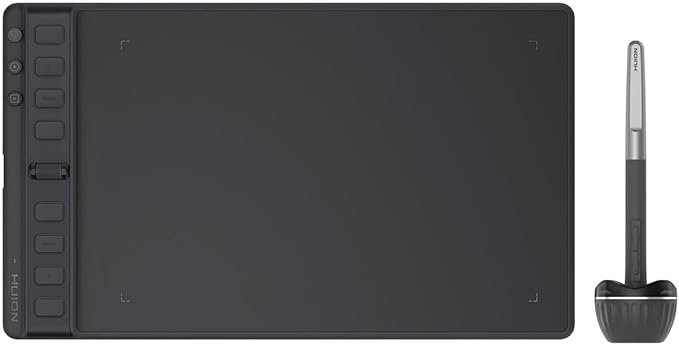
HUION Inspiroy 2 Medium Drawing Tablet with Scroll Wheel 8 Customized Keys Battery-Free Stylus 60 Tilt Support for Digital Art, Design, Sketch,
Item #:
71011013
XCD 242
Price Details
Excluding Shipping & Custom charges ( Shipping and custom charges will be calculated on checkout )
*All items will import from US
14%
In stock
 Imported from USA store
QTY:
Order now and get it around Thursday, July 02
Secured transaction
Ubuy works hard to protect your security and privacy. Our advanced payment security system ensures confidentiality by encrypting your information during transmission using AES (Advanced Encryption Standards) and SSL (Secure Socket Layer) protocols. Your payment details are 100% secure as we do not share your payment details with third party sellers.
Our Top Logistics Partners


Scroll into efficiency with the unique scroll wheel, write and draw like on paper with high-friction texture, and enjoy multi-OS compatibility for creative freedom on-the-go.

Fast
Shipping

Free
Return*

Secure Packaging

100% Original Products

PCI DSS Compliance

ISO 27001 Certified


Note: Step Down Voltage Transformer required for using electronics products of US store (110-120). Recommended power converters Buy Now.


What Stands Out
Customized Keys
Eight customizable shortcut keys allow artists to optimize their workflow, enhancing productivity by providing quick access to frequently used tools and functions during creative projects.
Battery-Free Stylus
The included battery-free stylus offers an uninterrupted drawing experience without the need for charging, ensuring that artists can focus entirely on their creative process without interruptions.
Large Active Area
With a generous 9x5 inch working area, the tablet provides ample space for detailed artwork and design work, catering to both beginners and professional artists looking for versatility and efficiency.
Product Details
- Advanced PenTech 3.0: Upgraded from PenTech 2.0 to PenTech 3.0, Inspiroy 2 art pad offers amazing precision & control over every line with no noticeable lag & wobble, just like a standard pen.
- Ergonomics Pen Design: The new digital stylus PW110 is improved designed with slimmer body, soft silicone grip & accessible side buttons for better ergonomics & comfort.
- Programmable Scroll & Shortcut Keys: Unique scroll wheel & 8 press keys can be customized to your favorite shortcut so that your creative work become smoother and more efficient. You also can change the setting for different apps.
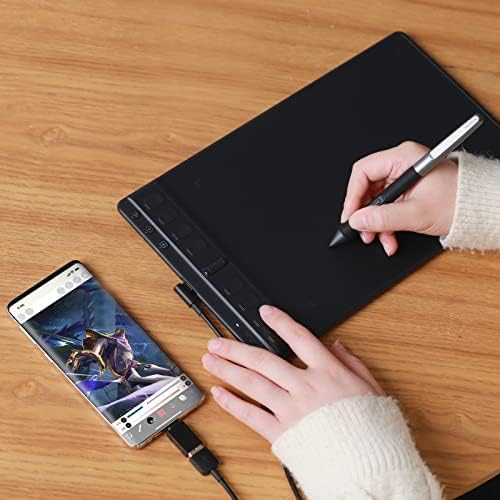
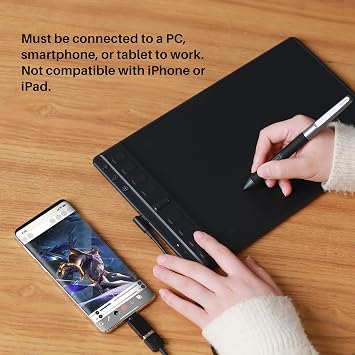
- Mobile Friendly: Enjoy creating on your Inspiroy 2 and see your drawings and paintings come to life on your Android smartphone or tablet (OS version 6.0 or later).
- Multi-OS Compatibility: Inspiroy 2 pen tablet is compatible with Mac (MacOS 10.12 or later), PC (Windows 7 or later), Linux(Ubuntu) , Android devices (OS version 6.0 or later) and ChromeOS 88 or later
- Please note: The art tablet is not a standalone product and has no internal power source. It must be connected to a computer, laptop, or smartphone using the included cable to work.
| Brand | HUION |
| Model Name | pentech |
| Built-In Media | Digital Pen, Pen Holder PH04/Standard Nib x 10, Quick Start Guide, USB-C Cable/USB-C Adapter |
| Target Audience | Art Student, Artist, Designer, Teacher |
| Model Number | Inspiroy 2 Medium Black |
| Manufacturer | Shenzhen Huion Animation Technology LTD. |
| Mfr Part Number | Inspiroy 2 Medium |
| Color | Black |
| Connectivity Technology | USB |
| Pressure Sensitivity | 8192 Levels |
| Operating System | Android 6.0 or later, ChromeOS 88 or later, HarmonyOS 2.0 or later/ Linux(Ubuntu 20.04 LTS), Windows 7 or later, macOS 10.12 or later |
| Additional Features | 60° Tilt Support, 8 Programmable Press Keys+3 Group Keys+Scoller, Advanced PenTech 3.0 |
| Specific Uses For Product | Designing |
| Compatible Devices | Desktop, Laptop, Smartphone |
| Native Resolution | 1920x1080 |
| Screen Size | 9 Inches (22.9 cm) |
| Item Weight | 420 Grams |
| Item Dimensions L x W | 5"L x 9"W (12.7 cm) |
| Active Surface Area | 8.7inches x 5.4inches (22.1 cm) |
| Operating System | Android 6.0 or later, ChromeOS 88 or later, HarmonyOS 2.0 or later/ Linux(Ubuntu 20.04 LTS), Windows 7 or later, macOS 10.12 or later See more |
| Special Feature | 60° Tilt Support, 8 Programmable Press Keys+3 Group Keys+Scoller, Advanced PenTech 3.0 |
Dangerous Goods
To avoid the delay in customs clearance process for Dangerous Goods, the shipment shall be opened at our warehouse facility to check the severity of hazardous components. Please see the list of Dangerous goods here.
What's in the box
Digital Pen
USB-C Cable/USB-C Adapter
Pen Holder PH04/Standard Nib x 10
Quick Start Guide
Who Should Buy?

-
Digital Artists
Perfect for digital artists needing precision and versatility in their creations without worrying about battery life.
-
Students & Learners
Ideal for students in design courses or anyone interested in developing their skills in digital art and sketching.
-
Hobbyist Designers
Great for hobbyist designers looking for an affordable yet effective tool for hobby projects and personal art.

-
Professional Illustrators
May not satisfy high-end professionals needing extensive features and larger screen size for detailed work.
-
Casual Users
Not suitable for casual users who might prefer simpler, less technical solutions like traditional paper and pencil.
-
Gaming Enthusiasts
Not intended for gamers looking for a tablet specifically designed for gaming activities or high-speed interaction.
Product Description
Have any Query? Chat with us
Customer Questions & Answers
-
Question:
What are the key features of the HUION Inspiroy 2 Small Drawing Tablet?
Answer: The HUION Inspiroy 2 Small Drawing Tablet boasts a range of impressive features including a user-friendly scroll wheel for seamless zooming and scrolling, six customizable hotkeys for quick access to your most-used functions, and a battery-free stylus which enhances the drawing experience without the need for regular charging. These features make it ideal for artists and designers looking for efficiency and functionality in their tools. -
Question:
Is the HUION Inspiroy 2 compatible with various operating systems?
Answer: Yes, the HUION Inspiroy 2 is widely compatible with various operating systems, including Windows, macOS, and Chrome OS. This versatility allows users to utilize the tablet across different devices, supporting various design software such as Photoshop, Illustrator, and others. Whether you are a professional artist or a hobbyist, this compatibility ensures that you can work on your projects with ease, regardless of the system you choose. -
Question:
How does the battery-free stylus work?
Answer: The battery-free stylus of the HUION Inspiroy 2 operates using electromagnetic resonance technology, which means it doesn't require charging or batteries. This innovation allows artists to draw continuously without interruptions and offers a natural pen-on-paper feel. For those who often find themselves sketching for extended periods, this feature is particularly beneficial as it reduces the hassle of battery concerns and enhances the creative flow. -
Question:
Can the hotkeys on the HUION Inspiroy 2 be customized?
Answer: Yes, the six hotkeys on the HUION Inspiroy 2 are fully customizable. Users can assign specific functions or shortcuts based on their personal workflow, allowing for greater convenience while designing or drawing. This adaptability is particularly useful for advanced users who may require specific tools or actions at their fingertips, improving productivity and overall user experience during lengthy projects. -
Question:
What is the drawing area size of the HUION Inspiroy 2 Small tablet?
Answer: The drawing area of the HUION Inspiroy 2 Small tablet is designed to provide ample space for creativity while remaining compact enough for ease of transport. This size strikes a balance, providing enough room for detailed work while being versatile for different workspaces, whether at home, in a studio, or on the go. Artists can utilize this area effectively for both intricate designs and casual sketches. -
Question:
What makes the scroll wheel on the HUION Inspiroy 2 tablet advantageous?
Answer: The scroll wheel on the HUION Inspiroy 2 enhances user interactivity by allowing for intuitive navigation through zooming in and out or scrolling through projects seamlessly. This feature is particularly beneficial for artists and designers as it facilitates quick adjustments without having to use keyboard shortcuts or mouse controls, making the creative process smoother and more efficient. -
Question:
What type of users would benefit the most from the HUION Inspiroy 2?
Answer: The HUION Inspiroy 2 is ideal for a diverse range of users including professional artists, graphic designers, illustrators, and hobbyists. Its portability and user-friendly features cater especially well to those who may need a reliable sketching tool for on-the-go creativity or home-based projects. Whether you're completing detailed digital illustrations or simply engaging in casual doodling, this tablet can enhance your creative workflow. -
Question:
How does the HUION Inspiroy 2 enhance the drawing experience?
Answer: The HUION Inspiroy 2 enhances the drawing experience through its responsive and precise stylus, which picks up on subtle details and strokes, making drawing feel intuitive and fluid. The user-friendly design, combined with features such as the customizable hotkeys and scroll wheel, significantly improve workflow and creativity. This enhancement is especially apparent when working on complex projects where precision and speed are critical. -
Question:
Is it suitable for beginners in digital art?
Answer: Absolutely! The HUION Inspiroy 2 is suitable for beginners in digital art. Its intuitive features, such as the battery-free stylus and customizable hotkeys, make it easy for newcomers to get started without feeling overwhelmed. The tablet also provides a solid balance of functionality and simplicity, ensuring that beginners can focus on developing their skills without unnecessary distractions. -
Question:
Where can I buy the HUION Drawing Tablet Inspiroy 2 in Grenada?
Answer: You can buy the HUION Drawing Tablet Inspiroy 2 from Ubuy, which offers a reliable platform for purchasing this product. Ubuy provides a straightforward online shopping experience along with various options for assistance, making it a great choice for securing your digital art tablet.
HUION Graphics Tablets Inspiroy 2 Medium Black Editorial Review


The 2023 HUION Inspiroy 2 Medium Drawing Tablet is receiving high praise from customers for its performance and usability. Many users are comparing it favorably to the popular Wacom Intuos tablet, stating that they prefer the HUION model. The pen, surface, pen stand, control, and scroll ring are all highlighted as standout features of this drawing tablet. One of the standout features of the HUION Inspiroy 2 is its slim and lightweight design, which makes it easy to travel with and toss into a backpack. This is particularly praised by both beginners and professionals who appreciate the portability of the device. Users also appreciate the great drawing quality of the tablet, with perfect pressure and accuracy. The inclusion of pen tilt functionality and the ability to adjust pressure curves through the driver program are additional positives. While the overall reception of the HUION Inspiroy 2 is overwhelmingly positive, there are a few minor issues that some users have encountered. One user mentioned that their cursor gets stuck on drag outside programs, but this can be resolved by turning off windows ink in the HUION pen settings. Additionally, some users have had to reinstall the driver to fix pressure sensitivity issues in certain programs. Overall, the 2023 HUION Inspiroy 2 Medium Drawing Tablet is highly praised for its performance, usability, and portability. It offers great value for its price and is recommended for both beginners and professionals who are looking for a reliable drawing tablet.
Customer Reviews & Ratings
919 customers ratings
-
5 Star
77%
-
4 Star
13%
-
3 Star
4%
-
2 Star
3%
-
1 Star
3%
Review this product
Share your thoughts with other customers
Pros
- Comparable to the popular Wacom Intuos tablet
- Excellent pen, surface, pen stand, control, and scroll ring
- Slim and lightweight design for easy portability
- Great drawing quality with perfect pressure and accuracy
- Pen tilt functionality and adjustable pressure curves through the driver program
Cons
- Cursor may get stuck on drag outside programs (can be resolved by turning off windows ink)
Product Price History
Important information
- Limitations : For products shipped internationally, please note that any manufacturer warranty may not be valid; manufacturer service options may not be available; product manuals, instructions, and safety warnings may not be in destination country languages; the products (and accompanying materials) may not be designed in accordance with destination country standards, specifications, and labeling requirements; and the products may not conform to destination country voltage and other electrical standards (requiring use of an adapter or converter if appropriate). The recipient is responsible for assuring that the product can be lawfully imported to the destination country. When ordering from Ubuy or its affiliates, the recipient is the importer of record and must comply with all laws and regulations of the destination country.
- Not all the products listed on Ubuy are for sale, as Ubuy is a global search engine. Products are subject to export/trade regulations.
XCD 242
Order now and get it around Thursday, July 02
This item is not restrict in my country.(Please click on above link if this item is not restrict in your country, So our team will review and allow.)
QTY:
Secured transaction
Ubuy works hard to protect your security and privacy. Our advanced payment security system ensures confidentiality by encrypting your information during transmission using AES (Advanced Encryption Standards) and SSL (Secure Socket Layer) protocols. Your payment details are 100% secure as we do not share your payment details with third party sellers.
Our Top Logistics Partners
Fastest cross-border delivery
Features & Benefits
- Unique Scroll Wheel for efficiency
- High-friction Texture for paper-like feel
- Multi-OS Compatibility for versatility
- Great for on-the-go creativity
- Left-handed artists friendly design
- 3-Set 8 Customized press keys for easy shortcuts