- Home Page /
- Arts Crafts & Sewing /
- Crafting Supplies /
- Craft Supplies /
- Cutting Tools /
- Creality Falcon A1 Pro 20W Laser Engraver, Fu...
0 ratings





Item #:
163303371
Creality Falcon A1 Pro 20W Laser Engraver, Full Enclosed 180W Output Laser Engraver Machine, Touch Screen, Auto Focus, APP Control, Pre-Assembled,
Item #:
163303371
XCD 3701
Price Details
Excluding Shipping & Custom charges ( Shipping and custom charges will be calculated on checkout )
*All items will import from US
In stock
 Imported from USA store
QTY:
Order now and get it around Friday, July 03
Secured transaction
Ubuy works hard to protect your security and privacy. Our advanced payment security system ensures confidentiality by encrypting your information during transmission using AES (Advanced Encryption Standards) and SSL (Secure Socket Layer) protocols. Your payment details are 100% secure as we do not share your payment details with third party sellers.
Our Top Logistics Partners


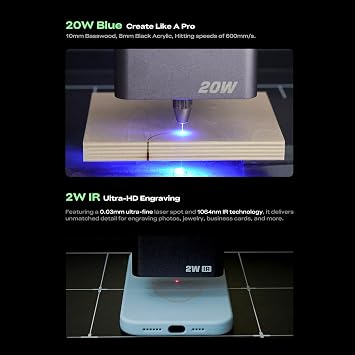
Create with professional precision—capable of cutting through 10 mm basswood and 8 mm black acrylic at speeds reaching 600 mm/s.

Fast
Shipping

Free
Return*

Secure Packaging

100% Original Products

PCI DSS Compliance

ISO 27001 Certified


Note: Step Down Voltage Transformer required for using electronics products of US store (110-120). Recommended power converters Buy Now.


What Stands Out
High Power Output
With a powerful 20W laser and 180W overall output, the Creality Falcon A1 Pro can efficiently engrave both wood and metal, making it versatile for various projects and materials.
User-Friendly Control
Equipped with a touch screen and app control, users can easily adjust settings and monitor projects, ensuring a seamless engraving experience without complex setups or technical knowledge.
Safety First Design
The full enclosure and Class 1 safety ratings ensure that users can operate the laser engraver with peace of mind, making it suitable for hobbyists and professionals alike in any workspace.
Product Details
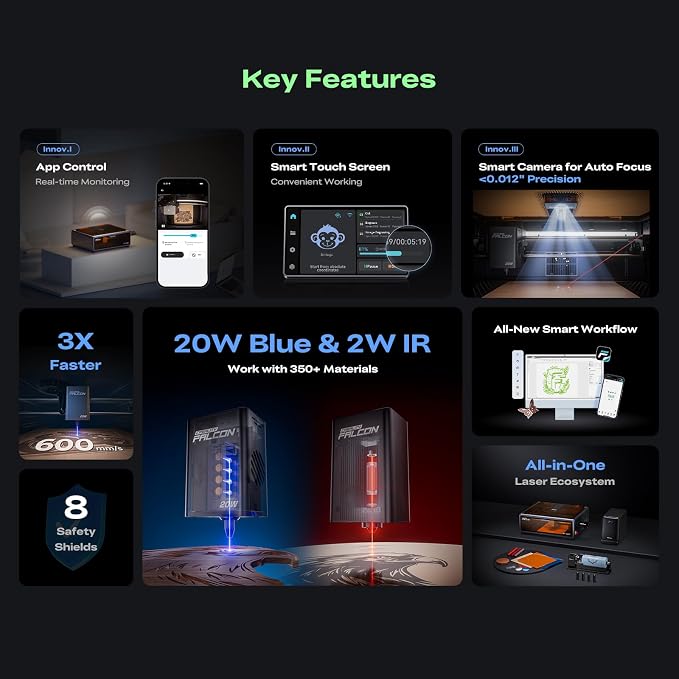
- Smart Touch Screen & APP Control- The Creality Falcon A1 Pro 20W laser engraver machine boasts a sleek, smartphone-style touchscreen for effortless, cable-free operation. Intelligent app control elevates your workflow with real-time monitoring from anywhere—whether on the couch or in the kitchen—keeping you instantly informed so you can multitask with confidence
- 3× Faster Speed & 8 Safety Shields- Creality A1 Pro 20W Laser engraver outpaces its peers with speeds up to 600 mm/s—three times faster—delivering batch efficiency to meet most needs. Dual protective covers filter 99% of light, protecting your eyes without goggles, while the enclosed design blocks smoke and noise. An internal fan speeds smoke removal, and safety is enhanced by an emergency stop and lid-open halt feature
- 20W Blue & 2W Red Light Switching- The Falcon A1 Pro 20W blue-laser engraver empowers you to create with professional precision—capable of cutting through 10 mm basswood and 8 mm black acrylic at speeds reaching 600 mm/s. For unparalleled fine work, the optional purchased 2W infrared (IR) module harnesses 1064 nm technology and a 0.03 mm ultra-fine laser spot, delivering extraordinary clarity for engraving photographs, jewelry, business cards, and more
- HD Camera & Leading Autofocus- Falcon A1 Pro Laser engraver machine high-definition camera previews the entire workspace, enabling precise object positioning for flawless cuts and engravings. Its camera control module, AI vision system, red-dot ranging laser, and Z-axis auto-lift deliver automatic focusing in just 3 seconds, achieving measurement accuracy within 0.012 inches for perfect results from the very first cut
- Pre-Assembly & Falcon Design- The Falcon A1 Pro 20W laser engraver arrives 80% pre-assembled, requiring only minimal setup to begin creating—ideal for seasoned designers and small businesses alike. With Falcon Design Space, effortlessly manage model selection, printing, and monitoring. Its streamlined UI offers intuitive guidance, enabling anyone to master the A1 Pro with ease, no expertise needed
- 【Compatibility & Expansion】 the Falcon A1 Pro is only compatible with 460 × 346mm(18.11” x13.62”) honeycomb panels. Please note that The 2W IR Laser Module for high-precision metal and plastic engraving is NOT included and needs to be purchased separately
| Product Dimensions (L x W x H) | 32 x 27 x 15 inches (81.3 x 68.6 x 38.1 cm) |
| Item model number | Laser Engraver |
| Manufacturer | Creality |
| Date First Available | August 1, 2025 |
| Package Weight | 47 Pound |
Who Should Buy?

-
Hobbyist Crafters
Perfect for hobbyists who engage in woodworking, metal projects, and wish to create unique custom pieces.
-
Small Business Owners
Ideal for small business owners looking to produce personalized items or signage for their customers.
-
Educators and Students
Great for educators or students in design and technology fields for hands-on learning experiences.

-
Professional Fabricators
May lack precision and power for high-demand, large-scale production environments and intricate fabrication requirements.
-
Beginners Without Guidance
Not suitable for those completely new to laser engraving without sufficient instructions or support.
-
Limited Space Users
Not ideal for users with restricted space due to its size, despite being a fully enclosed machine.
Product Description
Have any Query? Chat with us
Customer Questions & Answers
-
Question:
What materials can the Creality Falcon A1 Pro engrave and cut?
Answer: The Creality Falcon A1 Pro can engrave and cut a variety of materials, including wood, acrylic, leather, paper, and some metals. Its powerful 20W laser is designed for precision work on these substrates. This versatility makes it ideal for crafting projects, small business production, and artistic endeavors. Whether you're customizing wooden signs, creating intricate leather patterns, or designing personalized gifts, this engraver can handle multiple tasks with ease. -
Question:
How does the touch screen and APP control enhance user experience?
Answer: The Creality Falcon A1 Pro features a user-friendly touch screen and APP control that simplify the operation of the machine. The touch screen allows for easy navigation through settings and designs directly on the machine, while the APP control provides remote access and convenience. This enables users to start, stop, or modify engraving tasks from their smartphone or tablet, making it ideal for users who value mobility and flexibility in their workflow, especially for those managing multiple projects. -
Question:
Is the Creality Falcon A1 Pro suitable for beginners?
Answer: Yes, the Creality Falcon A1 Pro is designed to be beginner-friendly due to its pre-assembled setup and intuitive interface. New users can quickly get started without extensive technical knowledge, thanks to the straightforward controls and clear operational guidelines. Additionally, the machine's auto focus feature aids in achieving optimal engraving results without needing advanced skills, making it a great choice for hobbyists or individuals looking to explore laser engraving for the first time. -
Question:
What safety features are included with the Creality Falcon A1 Pro?
Answer: The Creality Falcon A1 Pro is equipped with comprehensive safety features, including a full enclosure that protects users from direct laser exposure and reduces hazardous fumes during the engraving process. Additionally, it incorporates an emergency stop switch and automatic shut-off capabilities in case of overheating. These features ensure that users can operate the machine safely and with confidence, making it suitable for both home use and educational settings. -
Question:
Can the Creality Falcon A1 Pro be used for commercial purposes?
Answer: Absolutely, the Creality Falcon A1 Pro is well-suited for commercial use. Its robust 180W output and high precision allow for efficient production of engraved items, which is ideal for businesses involved in custom engraving or manufacturing. Entrepreneurs can use this machine to create products like personalized gifts, promotional items, and detailed artwork, offering endless possibilities for income generation while providing high-quality outputs. -
Question:
How do you maintain and clean the Creality Falcon A1 Pro?
Answer: Maintaining and cleaning the Creality Falcon A1 Pro is straightforward. Regularly check the lens and mirrors for debris and grime, and clean them with a soft, lint-free cloth. Additionally, ensure that the interior enclosure is free from dust and residue after use, as this can impact performance. Proper maintenance not only extends the life of the engraver but also ensures consistent engraving quality, which is vital for achieving the best results in each project. -
Question:
What is the significance of the auto focus feature?
Answer: The auto focus feature of the Creality Falcon A1 Pro automatically adjusts the laser's focus on the material, ensuring optimal engraving depth and detail. This significantly enhances the engraving quality, as incorrect focus can lead to poor results or damage to materials. Users can achieve professional-level precision without manual adjustments, making it a game changer for both novices and experienced users engaged in diverse projects like signs, trophies, or intricate designs. -
Question:
Is the software for the Creality Falcon A1 Pro easy to use?
Answer: Yes, the software designed for the Creality Falcon A1 Pro is user-friendly and accessible, catering to both beginners and experienced engravers. It typically supports various file formats, allowing users to import their designs easily. Whether you're creating intricate artwork or simple text engravings, the software facilitates straightforward customization and preparation of projects. This ease of use encourages creativity and experimentation, making it an excellent tool for makers and artists. -
Question:
Where can I buy the Creality Falcon A1 Pro in Grenada?
Answer: You can purchase the Creality Falcon A1 Pro from Ubuy in Grenada. Ubuy offers a convenient online shopping experience, with detailed product information and various purchasing options. They provide international shipping and trackable delivery to ensure you receive your laser engraver safely and promptly, allowing you to start your engraving projects right away. -
Question:
What are some typical applications for the Creality Falcon A1 Pro?
Answer: The Creality Falcon A1 Pro is highly versatile, making it suitable for numerous applications, including personalized gifts, custom signage, model making, and even educational projects. Its precision allows artists and crafters to produce intricate designs on various materials, while small businesses might leverage it for product branding and marketing. This machine enables creativity in making jewelry, home décor, or promotional items, catering to a wide range of audiences and purposes.
Creality Cutting Tools Laser Engraver Editorial Review


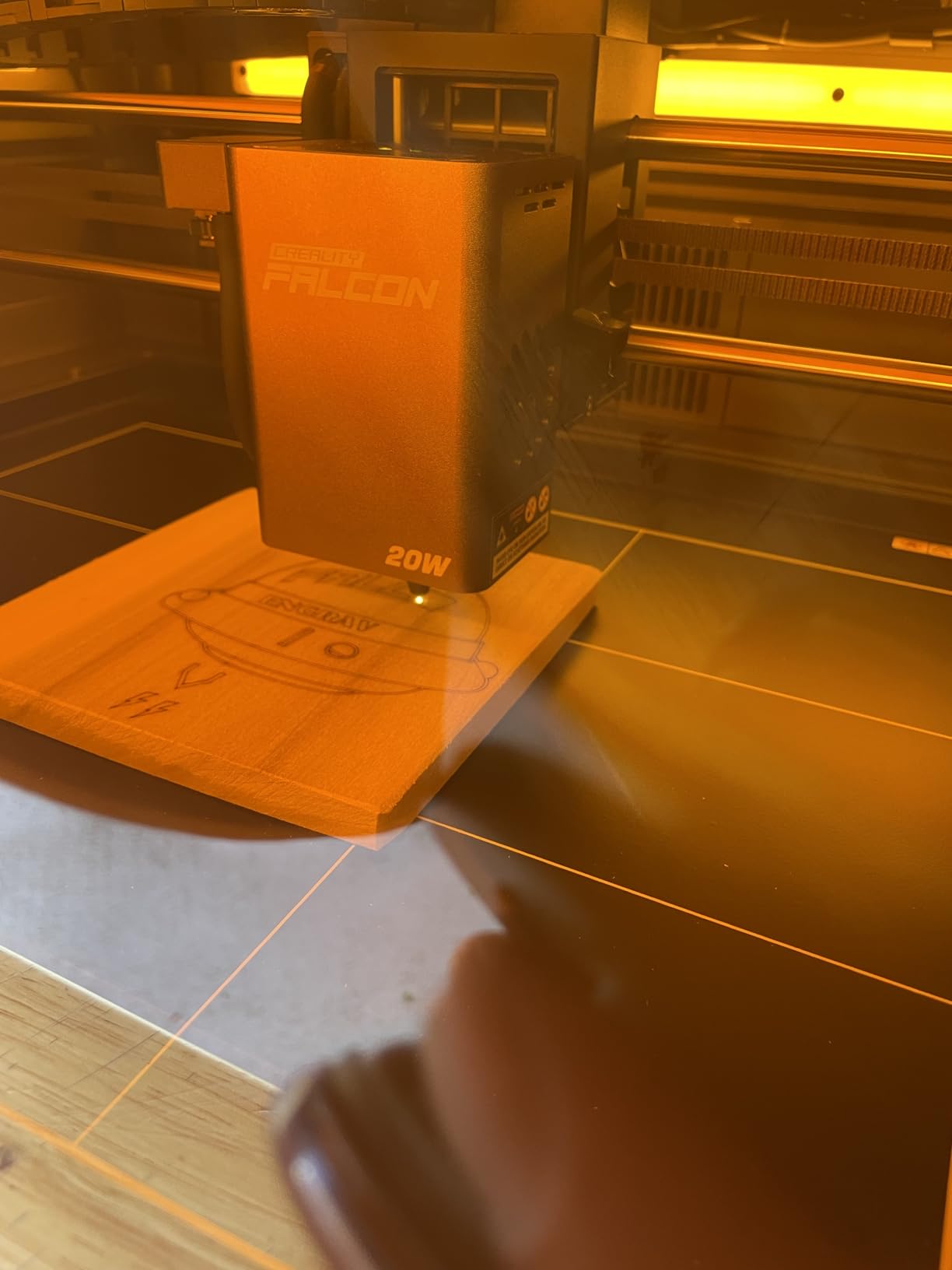


The Creality Falcon A1 Pro 20W Laser Engraver has surfaced as a highly praised tool among enthusiasts and newcomers alike in the world of laser engraving. Many users appreciate the straightforward setup and ease of use, particularly with the Lightburn software, which seems to enhance the device's functionality significantly. Although the original software has received mixed reviews, the overwhelming sentiment leans towards Lightburn as the preferred tool for engraving tasks. Customers have lauded the engraving quality, especially on materials such as wood and metal, while practitioners of crafting and small businesses find this machine an excellent addition to their toolkit. The enclosed design is particularly beneficial for smoke collection, adding an element of safety and cleanliness to the engraving process. While the machine comes mostly pre-assembled, there are minor quirks mentioned, such as the camera calibration—though these do not detract significantly from the overall experience. One common point of contention is the limited vertical movement of the laser head, which may pose challenges when working with thicker materials. Many users have resorted to using blocks to elevate the machine when necessary. Additionally, concerns have been raised about the key lock feature, which could be cumbersome for users who fear misplacing the key. Despite these minor criticisms, the Creality Falcon A1 Pro has garnered a positive reception, with several users expressing a desire to continue using it long-term. Its combination of user-friendliness, efficiencies in engraving, and enclosed workspace make it an enticing option, especially for those just entering the field. **
Customer Reviews & Ratings
19 customers ratings
-
5 Star
50%
-
4 Star
8%
-
3 Star
13%
-
2 Star
7%
-
1 Star
22%
Review this product
Share your thoughts with other customers
Pros
- Easy to use with Lightburn software
- High-quality engraving on various materials
- Enclosed design aids in smoke collection
- Quick setup, primarily pre-assembled
- Good for both novices and experienced users
Cons
- Original software is less favored than Lightburn
Product Price History
Important information
- Limitations : For products shipped internationally, please note that any manufacturer warranty may not be valid; manufacturer service options may not be available; product manuals, instructions, and safety warnings may not be in destination country languages; the products (and accompanying materials) may not be designed in accordance with destination country standards, specifications, and labeling requirements; and the products may not conform to destination country voltage and other electrical standards (requiring use of an adapter or converter if appropriate). The recipient is responsible for assuring that the product can be lawfully imported to the destination country. When ordering from Ubuy or its affiliates, the recipient is the importer of record and must comply with all laws and regulations of the destination country.
- Not all the products listed on Ubuy are for sale, as Ubuy is a global search engine. Products are subject to export/trade regulations.
XCD 3701
Order now and get it around Friday, July 03
This item is not restrict in my country.(Please click on above link if this item is not restrict in your country, So our team will review and allow.)
QTY:
Secured transaction
Ubuy works hard to protect your security and privacy. Our advanced payment security system ensures confidentiality by encrypting your information during transmission using AES (Advanced Encryption Standards) and SSL (Secure Socket Layer) protocols. Your payment details are 100% secure as we do not share your payment details with third party sellers.
Our Top Logistics Partners
Fastest cross-border delivery
Features & Benefits
- Sleek touchscreen and app control for effortless, cable-free operation.
- Three times faster than competitors, with speeds up to 600 mm/s.
- Dual protective covers filter 99% of light for eye safety.
- High-definition camera previews workspace for precise positioning.
- 80% pre-assembled for easy setup—perfect for beginners and pros.
- Expandable with optional 2W IR module for fine engraving.