- Home Page /
- Mobile Phone Accessories /
- Accessories /
- Maintenance, Upkeep & Repairs /
- Replacement Parts /
- Screens /
- LCD Screen Display Touch Digitizer Replacemen...
0 ratings

Item #:
51087232
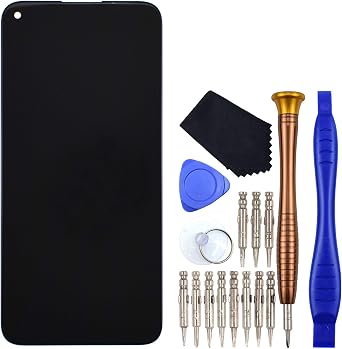
LCD Screen Display Touch Digitizer Replacement for Huawei nova 7i JNY-L21A JNY-L01A JNY-L21B Black
Item #:
51087232
XCD 97
Price Details
Excluding Shipping & Custom charges ( Shipping and custom charges will be calculated on checkout )
*All items will import from US
0 ratings
Write a review
In stock
 Imported from USA store
QTY:
Order now and get it around Wednesday, July 15
Secured transaction
Ubuy works hard to protect your security and privacy. Our advanced payment security system ensures confidentiality by encrypting your information during transmission using AES (Advanced Encryption Standards) and SSL (Secure Socket Layer) protocols. Your payment details are 100% secure as we do not share your payment details with third party sellers.
Our Top Logistics Partners


This replacement for Huawei nova 7i JNY-L22B JNY-L21A is brand new and original quality, repairing your broken or malfunctioning part.

Fast
Shipping

Free
Return*

Secure Packaging

100% Original Products

PCI DSS Compliance

ISO 27001 Certified


Note: Step Down Voltage Transformer required for using electronics products of US store (110-120). Recommended power converters Buy Now.


What Stands Out
High-Quality Display
Experience vibrant visuals with a premium LCD screen that ensures clarity and brightness, enhancing your overall device usage.
Touch Sensitivity
Super responsive touch digitizer guarantees smooth interaction, making navigation and usage effortless for a seamless user experience.
Perfect Compatibility
Designed specifically for Huawei nova 7i models, ensuring precise fit and performance, allowing for easy installation and lasting durability.
Product Details
| Country of Origin | This item will be imported from US |
| Item Weight | 0.5 lbs (230 grams) |
| What is in the box | LCD Screen Display Touch... For more details, please check description/product details |
Who Should Buy?

-
DIY Repair Enthusiasts
Ideal for individuals experienced in phone repairs, allowing them to replace damaged screens economically.
-
Budget-Conscious Users
Great for users seeking a cost-effective solution to fix their Huawei nova 7i instead of buying a new phone.
-
Technically Savvy Individuals
Perfect for those with technical skills to undertake repairs, ensuring a better understanding of smartphone components.

-
Inexperienced Users
Not suitable for those unfamiliar with phone repairs, as improper installation might further damage the device.
-
Non-Huawei Models
This product is specifically for Huawei nova 7i models only, incompatible with other smartphone brands or models.
-
Warranty Holders
Replacing the screen may void existing warranties, making it unwise for users with active manufacturer support.
Product Description
LCD Screen Display Touch Digitizer Replacement for Huawei nova 7i JNY-L21A JNY-L01A JNY-L21B Black
Have any Query? Chat with us
Customer Questions & Answers
-
Question:
What are the specifications of the LCD Screen Display Touch Digitizer for Huawei nova 7i?
Answer: The LCD Screen Display Touch Digitizer replacement for Huawei nova 7i features a 6.4-inch IPS LCD display with a resolution of 1080 x 2400 pixels. This ensures vibrant color reproduction and clarity, making it ideal for everyday tasks like web browsing and gaming. The touch sensitivity is highly responsive, providing a smooth user experience. It is specifically designed for the JNY-L21A, JNY-L01A, and JNY-L21B models, ensuring a perfect fit and seamless integration with your device. -
Question:
How can I install the LCD Screen Display Touch Digitizer myself?
Answer: Installing the LCD Screen Display Touch Digitizer requires some technical skills and tools such as a screwdriver, suction cup, and prying tool. Start by powering off your device and removing the back cover. Carefully detach the old screen using a prying tool, disconnect the flex cable, and replace it with the new digitizer. Following detailed video tutorials or step-by-step guides can enhance the process, but be cautious to prevent damage. This DIY approach can save you repair costs and enhance your understanding of your device. -
Question:
Is this digitizer compatible with other Huawei models?
Answer: The LCD Screen Display Touch Digitizer is specifically designed for the Huawei nova 7i models JNY-L21A, JNY-L01A, and JNY-L21B. Compatibility with other models is not guaranteed due to differences in size, connectors, and design. Using components meant for different models may lead to fitting and performance issues. Always check for compatibility before purchasing, ensuring you select the correct part for your device. -
Question:
What tools do I need to replace the screen of my Huawei nova 7i?
Answer: To replace the screen of your Huawei nova 7i, you'll need tools such as a small Phillips screwdriver, a suction cup, and a plastic prying tool. Optionally, a heat gun or hairdryer may help loosen adhesive around the screen. Having a clean workspace and ensuring proper organization of screws will streamline the process. These tools together provide a safer and more efficient installation experience, making it manageable even for beginners. -
Question:
What are common signs that my LCD screen needs to be replaced?
Answer: Common signs that indicate the need for an LCD screen replacement include persistent screen flickering, visible cracks or scratches, unresponsive touch areas, and discoloration such as spots or lines. If your screen displays these issues, it can significantly impair your experience. Promptly addressing these problems by replacing the LCD ensures your device operates reliably, maintaining communication, gaming, and multimedia functions. -
Question:
Does the digitizer come with adhesive for installation?
Answer: Typically, the LCD Screen Display Touch Digitizer should include adhesive pre-applied or as a separate strip necessary for installation. This is crucial for securely bonding the digitizer to the phone casing, preventing gaps or misalignment. If adhesive is not included, double-sided adhesive tape can be purchased separately. A solid adhesive ensures longevity and durability for your screen replacement. -
Question:
Can I use my phone while waiting to replace the screen?
Answer: Using your device with a damaged screen can be risky, as it may lead to further damage or injury from sharp edges. If your screen is only slightly damaged, you might be able to use the device for urgent needs, but it’s best to avoid using it extensively to prevent complications. Whenever possible, consider minimizing use until the replacement is installed to maintain functionality and protect your safety. -
Question:
How do I tell if the digitizer is original or a clone?
Answer: To determine if the LCD Screen Display Touch Digitizer is original or a clone, check the packaging, the quality of craftsmanship, and any branding. Original parts often come with manufacturer branding and high-quality finishes, while clones may show uneven edges or less vibrant displays. Look for customer reviews and buy from reputable sellers to increase the chances of receiving authentic components. This diligence protects your investment in the repair. -
Question:
Where can I buy LCD Screen Display Touch Digitizer Replacement for Huawei nova 7i in Grenada?
Answer: You can buy the LCD Screen Display Touch Digitizer Replacement for Huawei nova 7i JNY-L21A, JNY-L01A, JNY-L21B Black from Ubuy. This platform offers a wide selection of mobile parts, ensuring that you receive a quality product tailored for your specific model. Ubuy provides a user-friendly shopping experience and reliable customer service, making it a go-to destination for electronic replacements in Grenada. -
Question:
What should I do if the replacement screen has defects or malfunctions?
Answer: If you notice defects or malfunctions with your replacement screen after installation, the first step is to check the connections to ensure everything is plugged in correctly. If the screen is still faulty, consult the seller regarding their policy for defective items. Document the issue thoroughly and follow any provided steps for resolution. This approach allows you to act promptly and keep your device functional and reliable.
VEKIR Screens Editorial Review
No editorial reviews found
Customer Reviews & Ratings
1 customers ratings
-
5 Star
100%
-
4 Star
0%
-
3 Star
0%
-
2 Star
0%
-
1 Star
0%
Review this product
Share your thoughts with other customers
Product Price History
Important information
- Limitations : For products shipped internationally, please note that any manufacturer warranty may not be valid; manufacturer service options may not be available; product manuals, instructions, and safety warnings may not be in destination country languages; the products (and accompanying materials) may not be designed in accordance with destination country standards, specifications, and labeling requirements; and the products may not conform to destination country voltage and other electrical standards (requiring use of an adapter or converter if appropriate). The recipient is responsible for assuring that the product can be lawfully imported to the destination country. When ordering from Ubuy or its affiliates, the recipient is the importer of record and must comply with all laws and regulations of the destination country.
- Not all the products listed on Ubuy are for sale, as Ubuy is a global search engine. Products are subject to export/trade regulations.
XCD 97
Order now and get it around Wednesday, July 15
This item is not restrict in my country.(Please click on above link if this item is not restrict in your country, So our team will review and allow.)
QTY:
Secured transaction
Ubuy works hard to protect your security and privacy. Our advanced payment security system ensures confidentiality by encrypting your information during transmission using AES (Advanced Encryption Standards) and SSL (Secure Socket Layer) protocols. Your payment details are 100% secure as we do not share your payment details with third party sellers.
Our Top Logistics Partners
Fastest cross-border delivery
Features & Benefits
- Brand new and original quality
- Repairs broken or malfunctioning parts
- Perfect for Huawei nova 7i JNY-L22B, JNY-L21A, JNY-L01A, JNY-L21B, JNY-L22A, JNY-L02A, JNY-LX2
- Full protection packaging to avoid shipping damage
- Complete screen with display and touch function
- Includes a variety of tools for disassembling and repairing