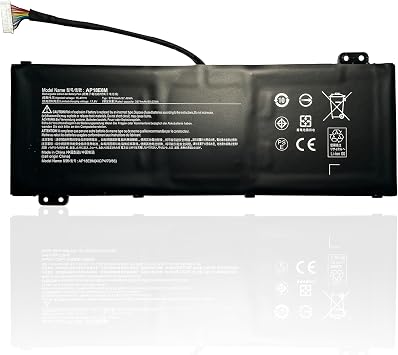
AP18E7M AP18E8M Battery for Acer Nitro 5 AN515-54 AN517-51 AN515-55 AN515-44 AN515-43 Nitro 7 AN715-51 Predator Helios 300 PH315-52 PH317-52
Ubuy works hard to protect your security and privacy. Our advanced payment security system ensures confidentiality by encrypting your information during transmission using AES (Advanced Encryption Standards) and SSL (Secure Socket Layer) protocols. Your payment details are 100% secure as we do not share your payment details with third party sellers.
Each of our AP18E7M AP18E8M battery for Acer is CE-/FCC-/RoHS-Certified
Fast
Shipping
Free
Return*
Secure Packaging
100% Original Products
PCI DSS Compliance
ISO 27001 Certified

What Stands Out
Product Details
| Item Weight | 2 lbs (910 grams) |
Dangerous Goods
To avoid the delay in customs clearance process for Dangerous Goods, the shipment shall be opened at our warehouse facility to check the severity of hazardous components. Please see the list of Dangerous goods here.
Who Should Buy?
-
Gaming Enthusiasts
Ideal for gamers needing extended battery life during intense gaming sessions without interruptions or sudden shutdowns.
-
Frequent Travelers
Perfect for users on the go who require a reliable battery for travel, enhancing productivity away from power sources.
-
Students and Professionals
Beneficial for students or professionals using Acer laptops for classes or presentations that demand higher battery reliability.
-
Casual Users
Not essential for users who primarily use laptops for light tasks, such as browsing or streaming videos occasionally.
-
Older Models
Incompatible and unnecessary for individuals using outdated laptop models that do not support this specific battery type.
-
Budget Buyers
May not suit users looking for more affordable battery options as this high-performance battery has a premium price tag.
Product Description
AP18E7M AP18E8M Battery for Acer Nitro 5 AN515-54 AN517-51 AN515-55 AN515-44 AN515-43 Nitro 7 AN715-51 Predator Helios 300 PH315-52 PH317-52 PH317-53,Triton 300 PT315-51 Aspire 7 A715-74G AN515-52
Customer Questions & Answers
-
Question:
What are the compatible models for the AP18E7M and AP18E8M batteries?
Answer: The AP18E7M and AP18E8M batteries are specifically designed for Acer Nitro 5 models, including AN515-54, AN517-51, AN515-55, AN515-44, and AN515-43, as well as Nitro 7 AN715-51 and Predator Helios 300 PH315-52 and PH317-52. This wide range of compatibility ensures that users with these specific gaming laptops can effectively upgrade their battery performance. By matching the appropriate battery model with your laptop, you can achieve enhanced power efficiency and prolonged usage, benefiting both casual and intensive gaming sessions. -
Question:
How do I know if my battery needs replacing?
Answer: To determine if your battery needs replacing, check for signs like reduced battery life, difficulty in charging, or unexpected shutdowns. If your laptop cannot hold a charge or shows unusual battery behavior, it may indicate that the battery is nearing the end of its life cycle. Regular monitoring of battery performance can help you identify when it’s time for a replacement, ensuring your device remains reliable for gaming or work tasks without interruptions. -
Question:
What tools do I need to replace the AP18E7M or AP18E8M battery?
Answer: Replacing the AP18E7M or AP18E8M battery typically requires a Phillips screwdriver, a plastic prying tool, and possibly an anti-static wrist strap to prevent static damage. These tools help you safely open your laptop casing and swap the battery without causing any harm to the internal components. It’s advisable to follow a detailed guide or tutorial specific to your model to ensure a smooth replacement process, allowing you to quickly return to gaming or productivity. -
Question:
Can I use my laptop while the battery is removed?
Answer: Yes, you can operate your laptop directly from the power adapter without the battery installed. However, doing this means you lose portability; if there’s a power outage or cable disconnection, your laptop would shut down immediately. This setting can be useful for troubleshooting battery issues or if you're awaiting a new battery. Just remember that it's essential to have a reliable power source to avoid unexpected data loss or system crashes. -
Question:
What safety precautions should I take when replacing my laptop battery?
Answer: When replacing your laptop battery, ensure that the laptop is powered down and unplugged from any power sources. Use an anti-static wrist strap to prevent damage from static electricity, and work in a clean, uncluttered area to avoid losing screws or other small components. Following manufacturer guidelines can also help ensure that you don’t accidentally cause any damage during the replacement process, which could lead to more extensive repairs. -
Question:
How do I extend the life of my new laptop battery?
Answer: To extend the life of your new AP18E7M or AP18E8M battery, keep your laptop cool and avoid exposing it to extreme temperatures. Regularly calibrating your battery by allowing it to discharge completely before recharging can also help maintain optimal performance. Additionally, reducing screen brightness and closing unused applications can significantly lessen power consumption, making it easier to enjoy longer use times during gaming or productivity tasks. -
Question:
What charging practices should I follow for my laptop battery?
Answer: For optimal charging practices, avoid letting your battery consistently drop to 0%. Ideally, charge your laptop when it reaches around 20% capacity and disconnect it once it reaches 100%. Also, try to keep your laptop plugged in when performing demanding tasks to limit battery cycles. Implementing these practices can help maintain the battery's health over time, which is crucial for all users, especially gamers who depend on extended use without interruptions. -
Question:
Is it safe to use third-party batteries for my laptop?
Answer: While third-party batteries may seem like a cost-effective option, they can vary widely in quality and safety. Using counterfeit or poorly manufactured batteries can pose risks, including overheating and hardware damage. It’s essential to choose reputable brands that provide compatible models like AP18E7M and AP18E8M to ensure the safety and efficiency of your laptop. Investing in a reliable battery helps safeguard your system's performance and longevity. -
Question:
Where can I buy AP18E7M AP18E8M Battery for Acer Nitro 5?
Answer: You can purchase the AP18E7M AP18E8M Battery for Acer Nitro 5 models from Ubuy in Grenada. Ubuy offers a wide range of electronic accessories, including laptop batteries, and ensures that you find the right match for your specific model. With Ubuy's reliable service, you can conveniently acquire the power solution needed for your gaming or productivity requirements. -
Question:
What is the expected lifespan of an AP18E7M or AP18E8M battery?
Answer: The expected lifespan of an AP18E7M or AP18E8M battery depends on usage patterns but generally ranges from 2 to 4 years. Factors influencing lifespan include charge cycles, device settings, and overall usage intensity. Adequate maintenance, such as utilizing power-saving features and avoiding extreme temperature exposure, can help prolong battery life. Being proactive about battery health allows users to enjoy longer performance between replacements.
KingEBOYEE Batteries Editorial Review
Customer Reviews & Ratings
-
5 Star
100%
-
4 Star
0%
-
3 Star
0%
-
2 Star
0%
-
1 Star
0%
Review this product
Share your thoughts with other customers
Platform Trust & Buyer Confidence
“The product received very good packaging & safe…Thank You”
“Accurate delivery timing given”
“Not madly expensive like I thought, and much quicker than promised.”
“Never dealt with Ubuy before, but everything worked out great. Seamless cross border purchasing and shipping. Thanks!”
“The process was smooth, with clear communication and timelines. This was my 1st purchase and I am really impressed. I will definitely be coming back.”
Product Price History
Important information
- Limitations : For products shipped internationally, please note that any manufacturer warranty may not be valid; manufacturer service options may not be available; product manuals, instructions, and safety warnings may not be in destination country languages; the products (and accompanying materials) may not be designed in accordance with destination country standards, specifications, and labeling requirements; and the products may not conform to destination country voltage and other electrical standards (requiring use of an adapter or converter if appropriate). The recipient is responsible for assuring that the product can be lawfully imported to the destination country. When ordering from Ubuy or its affiliates, the recipient is the importer of record and must comply with all laws and regulations of the destination country.
- Not all the products listed on Ubuy are for sale, as Ubuy is a global search engine. Products are subject to export/trade regulations.
Currently unavailable.
We don't know when or if this item will be back in stock.
This item is not restrict in my country.(Please click on above link if this item is not restrict in your country, So our team will review and allow.)
PCI DSS compliant and ISO 27001:2022 certified, with encrypted payments and full buyer protection on every order.
Features & Benefits
- CE-/FCC-/RoHS-Certified battery
- Fast charges and low power consumption
- Compatible with various Acer laptop models
- Assembled from top quality materials
- Overcharge and overdischarge protection
- Up to 500 recharge cycles over the life of the battery
Ubuy Assurance
Experience worry-free shopping with 100% original products, PCI DSS-compliant payment security, ISO 27001-certified data protection, the fastest cross-border delivery, free returns *, and secure packaging on every order.