0 ratings

Item #:
7195447
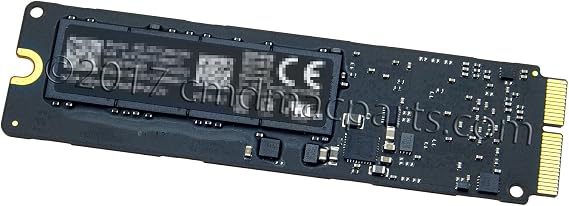
Odyson - 128GB SSD Replacement for Apple MacBook Air 13 A1466 Early 2015, 2016, 2017
Item #:
7195447
XCD 178
Price Details
Excluding Shipping & Custom charges ( Shipping and custom charges will be calculated on checkout )
*All items will import from US
0 ratings
Write a review
In stock
 Imported from USA store
QTY:
Order now and get it around Tuesday, July 07
Secured transaction
Ubuy works hard to protect your security and privacy. Our advanced payment security system ensures confidentiality by encrypting your information during transmission using AES (Advanced Encryption Standards) and SSL (Secure Socket Layer) protocols. Your payment details are 100% secure as we do not share your payment details with third party sellers.
Our Top Logistics Partners


128GB SSD Clean Version of MacOSX Sierra (10.12) installed All SSDs have been physically tested Compatibility with different models

Fast
Shipping

Free
Return*

Secure Packaging

100% Original Products

PCI DSS Compliance

ISO 27001 Certified


Note: Step Down Voltage Transformer required for using electronics products of US store (110-120). Recommended power converters Buy Now.


What Stands Out
High Storage Capacity
With 128GB of storage, this SSD provides ample space for files, applications, and media, catering specifically to MacBook Air users needing reliable and efficient data solutions.
Fast Transfer Speeds
Utilizing PCIe 3.0 x4 technology, this SSD delivers impressive read/write speeds, enhancing system performance and efficiency, significantly reducing load times for applications and files.
Mac Compatibility
Designed specifically for MacBook Air 13 A1466 (2015-2017), this SSD ensures seamless integration and maximum performance, providing a perfect upgrade solution for Apple device users.
Product Details
- 128GB SSD PCIe 3.0 x4 replacement for MacBook Air 13 A1466 Early 2015, 2016, 2017
- Compatible with models: A1466 MacBookAir7,2 Early 2015 and Early 2016
- Includes 1 - 128GB SSD
- Identifying Numbers: 661-02350, 661-02371, 661-02395, 655-1857, 655-1958, MZ-JPV1280, MZ-JPV128R, MZ-JPV128S
- Highly searched keywords: 128GB SSD, PCIe 3.0 x4, MacBook Air 13 A1466
| Item Weight | 0.1 lbs (50 grams) |
Who Should Buy?

-
Casual Users
Ideal for users needing basic storage upgrades for everyday tasks like web browsing, document editing, and media consumption.
-
Students
Perfect for students who require light storage solutions for applications, projects, and document storage without heavy gaming needs.
-
Budget-conscious Users
A great cost-effective solution for users looking to enhance their MacBook Air without spending excessively on larger SSDs.

-
Professional Designers
Not suitable for graphic designers who need extensive storage for high-resolution files and complex design software integrations.
-
Gamers
Limited capability for gamers requiring substantial space and speed for high-performance gaming applications and large installations.
-
Power Users
Not ideal for power users with demanding applications like video editing or software development who need large storage capacities.
Product Description
Odyson - 128GB SSD Replacement for Apple MacBook Air 13 A1466 Early 2015, 2016, 2017
Have any Query? Chat with us
Customer Questions & Answers
-
Question:
What is the storage capacity of the Odyson SSD replacement for MacBook Air?
Answer: The Odyson SSD replacement for Apple MacBook Air offers a storage capacity of 128GB. This amount of storage is ideal for users who need to store essential applications, documents, and media files without occupying too much space. Whether you’re using your MacBook for basic tasks like browsing and word processing or more advanced work like photo editing, this SSD provides enhanced performance compared to traditional hard drives. It’s particularly useful for users looking to optimize their MacBook Air's functionality. -
Question:
Is the Odyson SSD compatible with all MacBook Air models?
Answer: The Odyson 128GB SSD replacement is specifically designed for Apple MacBook Air models A1466 from the early 2015, 2016, and 2017 release. Before purchasing, it's crucial to verify your MacBook model to ensure compatibility. Using an SSD that is tailored for your specific model helps maintain optimal performance and prevent any potential issues. Upgrading to this SSD can help rejuvenate an older MacBook Air and extend its usability for your daily tasks. -
Question:
What benefits does an SSD provide over a traditional hard drive?
Answer: An SSD, like the Odyson replacement, provides several advantages over traditional hard drives, including faster boot times, quicker file transfers, and enhanced overall system responsiveness. Unlike hard drives that rely on spinning disks, SSDs use flash memory, allowing data to be accessed almost instantly. This upgrade can drastically improve your MacBook Air's performance, making tasks such as launching applications, opening files, and multitasking significantly smoother and more efficient. -
Question:
How do I install the Odyson SSD in my MacBook Air?
Answer: Installing the Odyson SSD involves a series of straightforward steps. First, you’ll need to power down your MacBook Air and disconnect it from any power source. Then, open the back cover to access the existing hard drive. Carefully remove the old drive and replace it with the Odyson SSD, ensuring proper alignment and connection. Once installed, close the cover, reboot your device, and proceed to format the new SSD. This process can significantly boost your MacBook’s performance once completed. -
Question:
Can I install the Odyson SSD myself, or should I seek professional help?
Answer: Installing the Odyson SSD is a feasible task for those who are comfortable with basic electronics. If you have prior experience with computer upgrades, you can likely complete the installation on your own. However, if you feel uncertain or have never handled internal components before, seeking professional assistance is recommended. A technician can help ensure that the installation is done correctly, avoiding any damage to your MacBook Air. The right choice depends on your confidence and technical skills. -
Question:
Will upgrading to an SSD improve battery life?
Answer: While the installation of an Odyson SSD may not directly extend battery life, it can lead to more efficient power consumption during operation. SSDs typically require less power than traditional hard drives, as they have no moving parts. This efficiency can result in less strain on the battery during tasks, potentially prolonging the overall uptime of your MacBook Air between charges, especially during light usage or idle periods. -
Question:
What types of tasks can I efficiently perform with the Odyson SSD in my MacBook Air?
Answer: With the Odyson 128GB SSD, you can efficiently perform various tasks, from routine applications like browsing the web, managing documents, and sending emails, to more demanding applications such as photo and video editing. The SSD's speed significantly reduces lag time when opening applications or files, providing a smooth experience even during multitasking or when running multiple applications simultaneously, making it suitable for both work and leisure activities. -
Question:
How does the Odyson SSD improve my computer's performance?
Answer: The Odyson SSD enhances your MacBook Air's performance by drastically reducing boot and load times, allowing software and applications to launch quickly. This speed improvement is due to the SSD’s use of NAND flash technology, which allows for faster read and write speeds compared to traditional hard drives. Users can expect a noticeable difference in overall responsiveness while handling tasks like file transfers, system updates, and video playback. -
Question:
Where can I buy Odyson - 128GB SSD Replacement for Apple MacBook Air 13 A1466 Early 2015, 2016, 2017?
Answer: You can purchase the Odyson - 128GB SSD Replacement for Apple MacBook Air 13 A1466 models from Ubuy in Grenada. Ubuy offers convenient access to this replacement SSD, providing a reliable option for upgrading your MacBook Air. With a user-friendly interface and a variety of purchasing options, Ubuy is a trusted platform to acquire this product and optimize your laptop's performance. -
Question:
What should I do if my MacBook Air doesn't recognize the new SSD?
Answer: If your MacBook Air fails to recognize the new Odyson SSD after installation, first check that it is properly seated in the slot. Restart the device and enter Disk Utility to see if the SSD appears there. If it does, you may need to format it. If issues persist, ensure that the SSD is compatible with your specific MacBook model. If needed, consider seeking professional help to troubleshoot the installation process.
Odyson Internal Components Editorial Review
This solid-state drive is highly compatible, and is suitable for a range of Macbook models. The drive is reported to deliver fast processing speeds, outperforming previous models with an even greater boost in processing power. Customer feedback of the product is largely positive, with most reviewers confirming the device’s compatibility and ease of use.
Customer Reviews & Ratings
1 customers ratings
-
5 Star
100%
-
4 Star
0%
-
3 Star
0%
-
2 Star
0%
-
1 Star
0%
Review this product
Share your thoughts with other customers
Pros
- Compatible with a range of Macbook models from mid-2013 to mid-2015.
- Delivers faster processing speeds compared to previous models.
- Positive customer feedback regarding compatibility and ease of use.
- Comes with Mac OS preinstalled.
Cons
- No tools or hardware are included with the purchase.
Product Price History
Important information
- Limitations : For products shipped internationally, please note that any manufacturer warranty may not be valid; manufacturer service options may not be available; product manuals, instructions, and safety warnings may not be in destination country languages; the products (and accompanying materials) may not be designed in accordance with destination country standards, specifications, and labeling requirements; and the products may not conform to destination country voltage and other electrical standards (requiring use of an adapter or converter if appropriate). The recipient is responsible for assuring that the product can be lawfully imported to the destination country. When ordering from Ubuy or its affiliates, the recipient is the importer of record and must comply with all laws and regulations of the destination country.
- Not all the products listed on Ubuy are for sale, as Ubuy is a global search engine. Products are subject to export/trade regulations.
XCD 178
Order now and get it around Tuesday, July 07
This item is not restrict in my country.(Please click on above link if this item is not restrict in your country, So our team will review and allow.)
QTY:
Secured transaction
Ubuy works hard to protect your security and privacy. Our advanced payment security system ensures confidentiality by encrypting your information during transmission using AES (Advanced Encryption Standards) and SSL (Secure Socket Layer) protocols. Your payment details are 100% secure as we do not share your payment details with third party sellers.
Our Top Logistics Partners
Fastest cross-border delivery
Features & Benefits
- 128GB SSD Clean Version of MacOSX Sierra (10.12) installed
- All SSDs have been physically tested
- Compatibility with different models