- Home Page /
- Office Products /
- Office Electronics /
- Other Office Equipment /
- Label Makers /
- Printer Head,Print Head Printhead Replacement...
0 ratings




Item #:
129561105
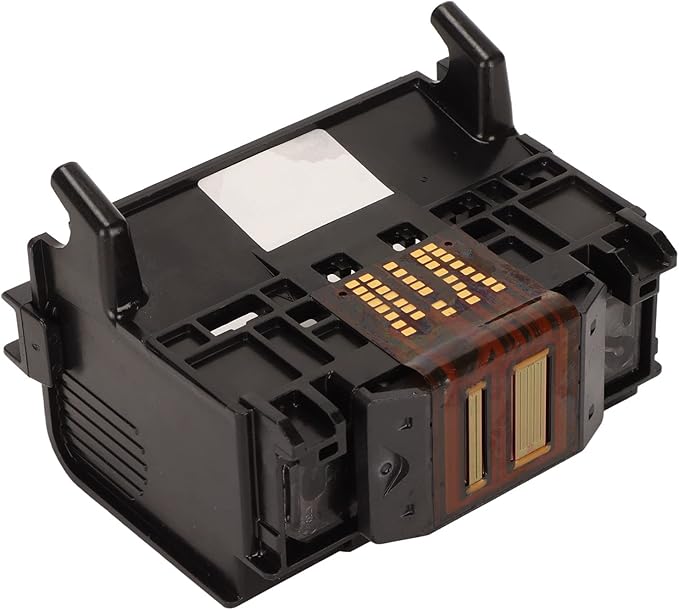
Printer Head,Print Head Printhead Replacement for HP Photosmart 7520 7510 7525 7515 C6340 D7560 C6350
Item #:
129561105
XCD 39
Price Details
Excluding Shipping & Custom charges ( Shipping and custom charges will be calculated on checkout )
*All items will import from US
0 ratings
Write a review
In stock
 Imported from USA store
QTY:
Order now and get it around Wednesday, July 22
Secured transaction
Ubuy works hard to protect your security and privacy. Our advanced payment security system ensures confidentiality by encrypting your information during transmission using AES (Advanced Encryption Standards) and SSL (Secure Socket Layer) protocols. Your payment details are 100% secure as we do not share your payment details with third party sellers.
Our Top Logistics Partners


This product is the perfect replacement for an old printhead.

Fast
Shipping

Free
Return*

Secure Packaging

100% Original Products

PCI DSS Compliance

ISO 27001 Certified


Note: Step Down Voltage Transformer required for using electronics products of US store (110-120). Recommended power converters Buy Now.


What Stands Out
Compatibility
Perfectly designed for HP Photosmart 7520, 7510, 7525, 7515, C6340, D7560, and C6350, ensuring seamless integration and optimal performance without compromising print quality.
Easy Installation
User-friendly design allows for quick and hassle-free installation, reducing downtime and making it convenient for users to replace their printhead without professional assistance.
High-Quality Output
Delivers sharp and vibrant prints, enhancing the overall quality of photos and documents, making it ideal for both home and office use to satisfy diverse printing needs.
Product Details
- Premium Materials: Made of ABS, it is safe and durable, and has a long service life. Tested in good working conditions.
- Easy To Identify: This printhead can be recognized by your printer. Do not use a syringe to push, and do not use various cleaning fluids to fill the nozzle. This can cause crossed colors to appear inside the nozzle.
- Easy To Use: Easy to use, easy to install and replace. Before installation, please make sure that the ink pump of the printer is working properly, and there is no problem with the ink cartridge or continuous ink supply.
- Lightweight and Compact: Small, lightweight and easy to use. This product is the perfect replacement for an old printhead.
- Applicable Scene: Suitable for HP Photosmart 7520 7510 7525 7515 C6340 D7560 C6350 printers.
| Package Dimensions | 5.35 x 4.57 x 3.23 inches (13.6 x 11.6 x 8.2 cm) |
| Item Weight | 2.82 ounces (79.95 grams) |
| Item model number | Vikye0862b3hk7w1113 |
| Date First Available | October 21, 2022 |
| Manufacturer | Vikye |
Who Should Buy?

-
Frequent Printers
Users who print regularly and need a reliable, high-quality print head for consistent performance and output.
-
Home Offices
Individuals running home offices requiring efficient and seamless printing to handle documents and presentations.
-
Budget-Conscious Users
Those looking to replace a damaged print head without spending on a new printer, maximizing functionality.

-
Occasional Users
Users who print infrequently may find a full replacement unnecessary and costly for minimal use.
-
Other Printer Models
This print head is specifically designed for certain HP models and won't fit or function in other brands.
-
Non-Tech Savvy
Individuals who struggle with installation or printer maintenance might face challenges replacing the print head.
Product Description
Have any Query? Chat with us
Customer Questions & Answers
-
Question:
What is a printer head and why is it important for my HP Photosmart printer?
Answer: A printer head, or print head, is a critical component that transfers ink onto paper during printing. It contains tiny nozzles that spray ink to create text and images. The quality and performance of your printer largely depend on a functioning print head; a clogged or damaged print head can lead to poor print quality or incomplete prints. Regular maintenance and timely replacement of the printer head ensure that your printer consistently delivers high-quality outputs, making it essential for both home users and professionals. -
Question:
How do I know if I need to replace the print head in my HP Photosmart printer?
Answer: You may need a print head replacement if you notice faded prints, streaks, or missing colors in your documents. Additionally, if you encounter error messages related to the print head during operation, this can also signal that replacement is necessary. Performing a standard print head cleaning through your printer's software can help determine the need for a new print head. If problems persist, replacing the print head will restore the print quality you expect from your HP Photosmart printer. -
Question:
Is installation of the replacement print head straightforward?
Answer: Yes, installing a replacement print head for your HP Photosmart printer is a manageable task. Most models come with instructions that guide you through the process. It typically involves removing the old print head, snapping in the new one, and performing a print head alignment using your printer’s software. Clear guides and video tutorials are also available to assist you during this process. This allows users to maintain their printers without requiring professional assistance. -
Question:
Can I use third-party print heads with my HP Photosmart printer?
Answer: Yes, compatible third-party print heads can be used with your HP Photosmart printer, but it’s essential to choose reliable brands. While these may offer cost savings, compatibility can vary, and the quality of prints may not always match that of original HP print heads. For consistent performance and print quality, using OEM parts is typically recommended. Always read reviews and check compatibility guides before making a purchase to ensure that you choose a print head that meets your needs. -
Question:
What should I do if my new print head doesn't work?
Answer: If your new print head doesn't work, first check that it is properly installed and securely seated in its slot. Then, run the printer's diagnostic tools to troubleshoot any issues. Common problems include misalignment or ink cartridge issues. Ensure your ink cartridges are full and correctly inserted. If the problem persists, refer to the manufacturer's instructions for any additional steps, or consider consulting customer support for further assistance. -
Question:
How long can I expect a replacement print head to last?
Answer: The lifespan of a replacement print head can vary based on usage frequency, type of print jobs, and the quality of ink used. Generally, a good-quality print head can last several months to a couple of years with regular, moderate use. For optimal lifespan, it’s recommended to conduct routine maintenance like print head cleaning. Monitoring your printing habits and following manufacturer guidelines can help in prolonging the life of your print head, ensuring consistent printing performance. -
Question:
What types of print heads are available for HP Photosmart printers?
Answer: HP Photosmart printers typically use either integrated or separate print head systems. Integrated print heads come combined with the ink cartridges, while separate print heads are standalone units that work with refillable ink cartridges. Depending on your printer model, you may have access to both types. Understanding your printer's requirements will help you choose the correct print head type, ensuring compatibility and optimal performance for your printing needs. -
Question:
Can I find replacement print heads specifically for my HP printer model?
Answer: Yes, replacement print heads are available specifically designed for various HP Photosmart models, including the 7520, 7510, 7525, 7515, C6340, D7560, and C6350. Make sure to check the specifications and ensure that the print head you select matches your printer for optimal compatibility. It’s crucial to choose the correct model to avoid performance issues and achieve the best quality in your printouts. -
Question:
Where can I buy Printer Head, Print Head Printhead Replacement for HP Photosmart 7520 7510 7525 7515 C6340 D7560 C6350?
Answer: You can buy the Printer Head replacement for your HP Photosmart printer through Ubuy. Ubuy offers a wide range of specialized printer accessories, ensuring you find the right print head compatible with your model. With a simple online search on Ubuy, you can easily locate and purchase the necessary components while benefiting from their customer service and support. -
Question:
What maintenance tips can I follow to extend the life of my printer head?
Answer: To extend the life of your printer head, regularly perform print head cleaning and alignment through your printer settings. Printing frequently prevents the nozzles from clogging with dried ink. Additionally, using high-quality inks helps maintain print head performance. Store your printer in a clean environment to protect it from dust and contaminants. Following these simple maintenance tips will help ensure that your printer head stays in good condition, providing high-quality prints over time.
Vikye Label Makers Vikye0862b3hk7w1113 Editorial Review
No editorial reviews found
Customer Reviews & Ratings
4 customers ratings
-
5 Star
0%
-
4 Star
32%
-
3 Star
0%
-
2 Star
0%
-
1 Star
68%
Review this product
Share your thoughts with other customers
Pros
- Compatible with multiple models
- Easy to install
- Affordable option
- Offers decent print quality
Cons
- May have reliability issues.
Product Price History
Important information
- Limitations : For products shipped internationally, please note that any manufacturer warranty may not be valid; manufacturer service options may not be available; product manuals, instructions, and safety warnings may not be in destination country languages; the products (and accompanying materials) may not be designed in accordance with destination country standards, specifications, and labeling requirements; and the products may not conform to destination country voltage and other electrical standards (requiring use of an adapter or converter if appropriate). The recipient is responsible for assuring that the product can be lawfully imported to the destination country. When ordering from Ubuy or its affiliates, the recipient is the importer of record and must comply with all laws and regulations of the destination country.
- Not all the products listed on Ubuy are for sale, as Ubuy is a global search engine. Products are subject to export/trade regulations.
XCD 39
Order now and get it around Wednesday, July 22
This item is not restrict in my country.(Please click on above link if this item is not restrict in your country, So our team will review and allow.)
QTY:
Secured transaction
Ubuy works hard to protect your security and privacy. Our advanced payment security system ensures confidentiality by encrypting your information during transmission using AES (Advanced Encryption Standards) and SSL (Secure Socket Layer) protocols. Your payment details are 100% secure as we do not share your payment details with third party sellers.
Our Top Logistics Partners
Fastest cross-border delivery
Features & Benefits
- Made of premium ABS materials for safety and durability.
- Easily identifiable by compatible printers to ensure proper use.
- Simple to install and replace for hassle-free operation.
- Lightweight and compact design for convenience.
- Compatible with specific HP Photosmart printer models.
- Tested for quality performance under good working conditions.