0 ratings


Item #:
88595296
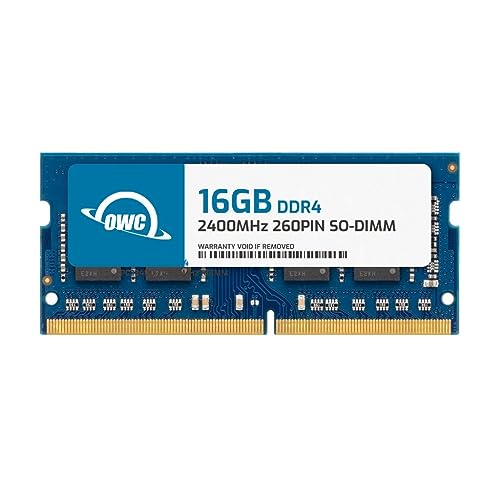
OWC 16GB DDR4 2400MHz PC4-19200 CL17 1.2V 260-Pin Non-ECC SODIMM Memory RAM Compatible with Dell Optiplex 3050 AIO, 3050 Micro, 5050, 5250 AIO, 7050
Item #:
88595296
XCD 470
Price Details
Excluding Shipping & Custom charges ( Shipping and custom charges will be calculated on checkout )
*All items will import from US
0 ratings
Write a review
In stock
 Imported from USA store
Order now and get it around Wednesday, July 22
Secured transaction
Ubuy works hard to protect your security and privacy. Our advanced payment security system ensures confidentiality by encrypting your information during transmission using AES (Advanced Encryption Standards) and SSL (Secure Socket Layer) protocols. Your payment details are 100% secure as we do not share your payment details with third party sellers.
Our Top Logistics Partners


Memory Upgrades are the Most Effective and Easy Way to Boost your PC's Performance.

Fast
Shipping

Free
Return*

Secure Packaging

100% Original Products

PCI DSS Compliance

ISO 27001 Certified


Note: Step Down Voltage Transformer required for using electronics products of US store (110-120). Recommended power converters Buy Now.


What Stands Out
High Capacity
With 8GB of DDR4 RAM, this memory module significantly enhances performance for multitasking, supporting a smoother experience in applications and workflows, making it a perfect choice for Dell Optiplex users.
Reliable Compatibility
Designed specifically for Dell Optiplex models, this SODIMM memory ensures seamless integration and compatibility, reducing the risk of errors and maximizing system efficiency, perfect for both business and personal use.
Energy Efficient
Operating at a low voltage of 1.2V, this memory is energy-efficient, reducing overall power consumption while maintaining high performance, contributing to enhanced system longevity and better energy savings.
Product Details
| Item Weight | 0.1 lbs (50 grams) |
Who Should Buy?

-
Casual Users
Ideal for everyday tasks like browsing, streaming, and simple productivity applications.
-
Office Environments
Perfect for business settings that require reliable performance for presentations, emails, and basic applications.
-
Upgraders
Great option for users looking to enhance performance from lower RAM capacity in compatible Dell models.

-
Gamers
Not suitable for intensive gaming due to lower speeds and capacity compared to high-performance RAM.
-
High-End Tasks
May not support demanding applications like video editing, 3D rendering, or heavy multitasking efficiently.
-
Non-Compatible Models
Users with systems outside Dell Optiplex compatibility may face issues with installation and performance.
Product Description
OWC 16GB DDR4 2400MHz PC4-19200 CL17 1.2V 260-Pin Non-ECC SODIMM Memory RAM Compatible with Dell Optiplex 3050 AIO, 3050 Micro, 5050, 5250 AIO, 7050 Snp821Pjc16G
Have any Query? Chat with us
Customer Questions & Answers
-
Question:
What are the key specifications of the OWC 16GB DDR4 RAM?
Answer: The OWC 16GB DDR4 RAM operates at a frequency of 2400MHz and is built on the PC4-19200 platform, with a latency of CL17 and a voltage of 1.2V. Its 260-pin SODIMM form factor makes it perfect for compatible devices. This RAM is specifically designed for models like the Dell Optiplex 3050 AIO, 3050 Micro, 5050, 5250 AIO, and 7050, ensuring that you can enhance system performance seamlessly. Upgrading RAM boosts multitasking capabilities and improves applications performance, making it ideal for users who require efficient processing for everyday tasks or heavier applications. -
Question:
Is OWC 16GB DDR4 RAM compatible with my Dell Optiplex 3050 AIO?
Answer: Yes, the OWC 16GB DDR4 RAM is fully compatible with the Dell Optiplex 3050 AIO among other models. Its 260-pin configuration and specifications align perfectly with the design of Dell’s systems, ensuring reliable performance. This compatibility allows users to upgrade their systems effectively. If you often run memory-intensive applications or multitask, upgrading your RAM to this 16GB option can significantly enhance your device's speed and responsiveness, ultimately improving your overall experience with the machine. -
Question:
What benefits does upgrading to 16GB of RAM provide?
Answer: Upgrading to 16GB of RAM offers several advantages, including smoother multitasking capabilities and improved efficiency when running large applications. With increased memory, your system can handle more processes simultaneously without a slowdown. This is particularly beneficial for users engaged in video editing, graphic design, or software development, where heavy memory usage is common. Additionally, more RAM can reduce loading times and enhance overall system performance, resulting in quicker access to tools and files you use regularly. -
Question:
What is the difference between ECC and Non-ECC RAM, and why choose Non-ECC?
Answer: ECC (Error-Correcting Code) RAM can detect and correct internal data corruption, making it suitable for critical applications. Non-ECC RAM, like the OWC 16GB DDR4, is typically faster and less expensive, making it ideal for everyday use, gaming, and standard business tasks. Most personal and office computers, including many Dell models, don’t require ECC for optimal function. Choosing Non-ECC RAM can provide sufficient performance for general use while being a cost-effective solution for users who do not need the additional data integrity that ECC provides. -
Question:
Can I mix different RAM sizes and speeds in my Dell system?
Answer: You can mix different RAM sizes in your Dell system, but it may not be recommended. Ideally, all RAM should match in specifications, including size, speed, and timings for the best performance. If you mix RAM, your system will run all modules at the speed of the slowest one, which might prevent you from fully utilizing the speed benefits of newer modules. For optimal performance, especially with demanding applications, it’s recommended to either upgrade to similar specifications or use pairs of the same size and speed RAM, ensuring compatibility and stability. -
Question:
How does RAM installation affect my computer's performance?
Answer: Installing additional RAM significantly affects your computer's performance, particularly in multitasking and running applications. Increased RAM allows your system to manage more data simultaneously, leading to smoother operation and faster load times. For users who often have multiple applications open or run resource-intensive software, a RAM upgrade can reduce lag and improve system responsiveness. This capability is especially crucial for graphic design, gaming, or software development tasks where every bit of performance counts. -
Question:
What type of memory is best suited for gaming?
Answer: For gaming, the best type of memory tends to be high-speed DDR4 RAM, such as the OWC 16GB DDR4 2400MHz. Higher frequency RAM can improve frame rates and overall game performance, particularly in modern titles that demand more memory. While the OWC RAM is well-suited for gaming due to its larger capacity, gamers might also consider RAM with lower latency for quicker data access. Overall, a balance between capacity and speed will enhance gaming experience while ensuring competitive performance. -
Question:
How can I identify if my current RAM needs to be upgraded?
Answer: To determine if your current RAM needs an upgrade, monitor your system during daily activities. If you frequently experience slow performance, lags during multitasking, or applications crashing, these could be signs of insufficient memory. Use task manager tools to check current RAM usage; if it's consistently near or at capacity, upgrading to a higher memory configuration would significantly enhance performance. Additionally, demanding programs like video editors or graphic design software may also indicate the need for more RAM for better functionality. -
Question:
What is the maximum RAM capacity supported by my Dell Optiplex models?
Answer: The maximum RAM capacity supported by Dell Optiplex models can vary depending on the specific model. For example, the Optiplex 3050 and 5050 typically support up to 32GB of RAM, while the 5250 AIO and 7050 often also have similar or higher configurations. It's crucial to check the user manual or manufacturer specifications for your specific model to ensure compatibility with your upgrades. Make sure that your installation meets these guidelines to effectively leverage the capabilities of higher RAM limits for enhanced performance. -
Question:
Where can I buy OWC 16GB DDR4 RAM in Grenada?
Answer: You can purchase the OWC 16GB DDR4 2400MHz RAM from Ubuy in Grenada. Ubuy offers a convenient shopping experience with a variety of electronics and computer parts, ensuring that you find the right upgrade for your Dell Optiplex models efficiently. Their online platform provides detailed product information and user reviews, helping you make an informed decision. Best of all, Ubuy often features competitive offers and a seamless purchasing process to facilitate your upgrade needs.
OWC Memory Editorial Review
No editorial reviews found
Customer Reviews & Ratings
1 customers ratings
-
5 Star
0%
-
4 Star
100%
-
3 Star
0%
-
2 Star
0%
-
1 Star
0%
Review this product
Share your thoughts with other customers
Pros
- High-performance 2400MHz speed
- 16GB capacity for multitasking
- Compatible with multiple Dell models
- Energy-efficient 1.2V operation
- Easy installation for users
Platform Trust & Buyer Confidence

MT
Mohd
Verified buyer
“The product received very good packaging & safe…Thank You”
16 June 2026 · via Trustpilot
SJ
Shawati
Verified buyer
“Accurate delivery timing given”
16 June 2026 · via Trustpilot
YB
Youcef
Verified buyer
“Not madly expensive like I thought, and much quicker than promised.”
15 June 2026 · via Trustpilot
LM
Leila
Verified buyer
“Never dealt with Ubuy before, but everything worked out great. Seamless cross border purchasing and shipping. Thanks!”
6/7/2026 · via Trustpilot
KA
Kwame
Verified buyer
“The process was smooth, with clear communication and timelines. This was my 1st purchase and I am really impressed. I will definitely be coming back.”
12 June 2026 · via Trustpilot
Secure Checkout
Global Delivery
Easy Returns
Genuine Products
Product Price History
Important information
- Limitations : For products shipped internationally, please note that any manufacturer warranty may not be valid; manufacturer service options may not be available; product manuals, instructions, and safety warnings may not be in destination country languages; the products (and accompanying materials) may not be designed in accordance with destination country standards, specifications, and labeling requirements; and the products may not conform to destination country voltage and other electrical standards (requiring use of an adapter or converter if appropriate). The recipient is responsible for assuring that the product can be lawfully imported to the destination country. When ordering from Ubuy or its affiliates, the recipient is the importer of record and must comply with all laws and regulations of the destination country.
- Not all the products listed on Ubuy are for sale, as Ubuy is a global search engine. Products are subject to export/trade regulations.
XCD 470
Order now and get it around Wednesday, July 22
This item is not restrict in my country.(Please click on above link if this item is not restrict in your country, So our team will review and allow.)
QTY:
Secured transaction
PCI DSS compliant and ISO 27001:2022 certified, with encrypted payments and full buyer protection on every order.
Our Top Logistics Partners
Fastest cross-border delivery
Features & Benefits
- 16GB DDR4 memory enhances overall PC performance.
- Compatible with various Dell Optiplex models.
- PC4-19200 speed for efficient data processing.
- 1.2V power requirement for energy efficiency.
- 260-pin SO-DIMM format ensures a snug fit.
- Easy DIY installation with tutorial support available.
Ubuy Assurance
Experience worry-free shopping with 100% original products, PCI DSS-compliant payment security, ISO 27001-certified data protection, the fastest cross-border delivery, free returns *, and secure packaging on every order.