0 ratings




Item #:
243791065
AV Access KVM Switch USB C Docking Station Dual Monitors for 2 Computers
87% of respondents would recommend this to a friend
Item #:
243791065
XCD 739
Price Details
Excluding Shipping & Custom charges ( Shipping and custom charges will be calculated on checkout )
*All items will import from US
13%
In stock
 Imported from USA store
QTY:
Order now and get it around Thursday, September 24
Secured transaction
Ubuy works hard to protect your security and privacy. Our advanced payment security system ensures confidentiality by encrypting your information during transmission using AES (Advanced Encryption Standards) and SSL (Secure Socket Layer) protocols. Your payment details are 100% secure as we do not share your payment details with third party sellers.
Our Top Logistics Partners


Build a powerful workstation at home, with ease.

Fast
Shipping

Free
Return*

Secure Packaging

100% Original Products

PCI DSS Compliance

ISO 27001 Certified



Note: Step Down Voltage Transformer required for using electronics products of US store (110-120). Recommended power converters Buy Now.


What Stands Out
Dual Monitor Support
Seamlessly connect two monitors for enhanced productivity, allowing users to multitask efficiently across different applications, making it ideal for home offices or professional environments.
4K60Hz Output
Experience stunning visuals with 4K resolution at 60Hz, ensuring clear and sharp images for detailed work or entertainment, outpacing many competitors with lower resolution capabilities.
Versatile Connectivity
Equipped with multiple USB 3.0 ports and SD card slot, this docking station provides extensive connectivity options for peripherals, catering to diverse user needs and ensuring a clutter-free workspace.
Product Details
| Operation Mode | KVM Switch |
| Current Rating | 6 A |
| Operating Voltage | 20 volts_of_direct_current |
| Contact Type | Hdmi Type-a 19-pin |
| Connector Type | Displayport, Hdmi, Type-c |
| Switch Type | Button Switch |
| Terminal | Pc, Laptop |
| Circuit Type | 2-way |
| Mounting Type | Surface Mount |
| Number of Positions | 2 |
| Control Method | Touch |
| Connectivity Protocol | Ethernet |
| Wattage | 120 |
| Control Type | Manual |
| Compatible Devices | Desktops, Laptops, MacBook |
| Color | Grey |
| Item Dimensions | 5.5 x 3.7 x 1.9 inches (14 x 9.4 x 4.8 cm) |
| Unit Count | 1 Count |
| Number of Items | 1 |
| Material Type | Aluminum |
| Contact Material | Copper |
| International Protection Rating | IP00 |
| Specification Met | Ce Fcc |
| Brand Name | v AV Access |
| Model | iDock C10 |
| Manufacturer | AV ACCESS |
| Part Number | iDock C10 |
| Brand | v AV Access |
| Material | Aluminum |
| Item dimensions L x W x H | 5.5 x 3.7 x 1.9 inches (14 x 9.4 x 4.8 cm) |
| Package Weight | 6.51 Pound |
| Country of Origin | This item will be imported from US |
| What is in the box | AV Access KVM Switch... For more details, please check description/product details |
Who Should Buy?

-
Remote Workers
Ideal for remote workers needing connectivity for multiple devices and enhanced productivity with dual monitors and additional ports.
-
Creative Professionals
Perfect for graphic designers and video editors who require high-resolution displays and multiple USB connections for peripherals.
-
Tech Enthusiasts
Great for tech-savvy users who frequently switch between laptops, offering efficient workspace management with a KVM switch feature.

-
Casual Users
Not suitable for basic users with single device needs, as it provides more features than they may require.
Product Description
Have any Query? Chat with us
Customer Questions & Answers
-
Question:
What is the AV Access KVM Switch USB C Docking Station?
Answer: The AV Access KVM Switch USB C Docking Station is a high-performance device that allows you to connect two computers to dual monitors while efficiently managing peripherals. It features 4K at 60Hz resolution support, 1G Ethernet connectivity, EDID emulation, and a 5-port USB 3.0 hub, ensuring that your devices can communicate seamlessly. This device is particularly useful for multitasking professionals, enabling smoother transitions between devices in a home office setting. -
Question:
What are the key features of the AV Access KVM Switch?
Answer: Key features include dual monitor support with 4K60Hz resolution, 1G Ethernet for reliable internet access, EDID for better display management, audio output compatibility, and a robust 5x USB 3.0 hub. Additionally, it provides 60W charging capability, making it versatile for devices like Dell, HP, and Lenovo laptops. These features are designed to enhance productivity and efficiency for users who frequently switch between multiple computers. -
Question:
Can the AV Access KVM Switch be used with Dell, HP, and Lenovo laptops?
Answer: Yes, the AV Access KVM Switch is compatible with Dell, HP, and Lenovo laptops, among others. Its USB-C connectivity allows for broad compatibility across devices, making it an excellent choice for diverse work environments. Whether you are presenting, working on projects, or simply need more screen space, this docking station adapts to your needs, providing a seamless experience without the hassle of switching connections every time. -
Question:
How does the EDID feature work in this KVM switch?
Answer: EDID, or Extended Display Identification Data, allows the KVM switch to communicate the capabilities of the connected monitors to the computer. This ensures that the optimal resolution and refresh rate are used automatically. For instance, when switching between devices with different monitor setups, EDID optimizes your display settings on-the-fly, enabling you to work without manually adjusting settings each time. -
Question:
What is the maximum resolution supported by the AV Access KVM Switch?
Answer: The AV Access KVM Switch supports a maximum resolution of 4K at 60Hz for dual monitors. This means you can enjoy stunning, high-definition visuals, making it ideal for graphic design, video editing, or any task that benefits from superior display quality. Such high resolution enhances productivity, particularly in a dual-monitor setup where clarity and detail are paramount. -
Question:
Does the AV Access KVM Switch support audio output?
Answer: Yes, the AV Access KVM Switch supports audio output, allowing you to connect audio devices directly or route sound through your monitor. This capability is especially beneficial for presentations and video calls, ensuring both audio and visual components work seamlessly together. Whether you're streaming music or participating in a conference call, this feature enhances the overall functionality of your workspace. -
Question:
How can I connect my devices to the AV Access KVM Switch?
Answer: Connecting your devices is straightforward with the AV Access KVM Switch. You simply need to connect your two computers using USB-C cables, attach your monitors via HDMI, and plug in any additional peripherals to the USB hub. Within moments, you can easily toggle between computers using the KVM switch, making it an efficient solution for multitasking and improving your workflow in a home office environment. -
Question:
What type of users would benefit most from the AV Access KVM Switch?
Answer: Professionals who work with multiple computers, such as developers, graphic designers, or remote workers, would find the AV Access KVM Switch exceptionally beneficial. It streamlines digital workflows by allowing them to control two systems from one station with ease, enhancing efficiency. Additionally, anyone who requires dual monitor support for presentations or multitasking will find this device invaluable for their daily operations. -
Question:
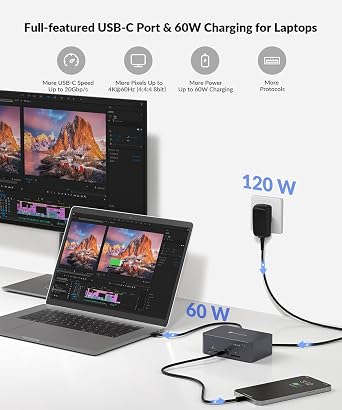
How does the 60W charging feature work?
Answer: The 60W charging feature of the AV Access KVM Switch allows you to power your laptop while using it, reducing cable clutter and maintaining a tidy workspace. As you connect your compatible device via USB-C, it receives sufficient power to operate, keeping you productive without needing to plug it into a separate charger. This is particularly useful during long work sessions, ensuring you stay powered up without interruptions. -
Question:
Where can I buy the AV Access KVM Switch USB C Docking Station?
Answer: You can buy the AV Access KVM Switch USB C Docking Station from Ubuy, which provides a reliable platform to purchase this product in Grenada. Ubuy offers a user-friendly shopping experience, along with detailed product information, making it easier to make an informed decision when shopping for your home office needs.
v AV Access KVM Switches Editorial Review


AV Access KVM Switch USB C Docking Station Dual Monitors for 2 Computers is designed for seamless transitions between devices, featuring 4K60Hz video output and multiple ports including a robust 5xUSB 3.0 Hub. Users appreciate the straightforward installation and easy switch between their home PC and work laptop, enhancing their productivity. Many have noted excellent compatibility, particularly with USB-C devices. However, there are minor drawbacks such as the lack of an On/Off switch and some warmth during operation. While the KVM provides substantial functionality, adding options like hotkey switching could enhance usability further. Overall, it serves well for dual-monitor setups and enhances workspace organization for users with multiple devices.
Customer Reviews & Ratings
266 customers ratings
-
5 Star
68%
-
4 Star
11%
-
3 Star
7%
-
2 Star
4%
-
1 Star
10%
Review this product
Share your thoughts with other customers
Pros
- Seamless switching between two computers
- Easy installation with clear markings
- Supports multiple USB ports
- Great for Samsung DeX setup
- High-quality 4K resolution output
Cons
- It can get warm during normal operation.
Platform Trust & Buyer Confidence

JK
Jasmin
Verified buyer
“Great products and very good service: very easy and very fast international delivery.”
9 September 2026 · via Trustpilot
AG
Anke
Verified buyer
“Wonderful online shopping experience, smooth transaction from the start. Payment method works conveniently and delivery is unexpectedly fast and reliable. You go the extra mile for service. What makes this even more amazing, you deliver to Namibia. I will remain a happy Ubuy customer and will increase my purchases for sure! Thank you!”
10 September 2026 · via Trustpilot
H
Hazel
Verified buyer
“Very easy to find the products what you need, and so fast delivery, that’s why I highly recommended to others costumers to used ubuy.”
10 September 2026 · via Trustpilot
O
Opaleye
Verified buyer
“I received exactly what I ordered I was skeptical about your site because that was my first time to order. But the order came timely and neatly packaged. I was not disappointed. Thank you.”
11 September 2026 · via Trustpilot
AC
Adele
Verified buyer
“Easy to find and order what you want on the website. Delivery is quick to the UK”
8 September 2026 · via Trustpilot
Secure Checkout
Global Delivery
Easy Returns
Genuine Products
Product Price History
Important information
- Limitations : For products shipped internationally, please note that any manufacturer warranty may not be valid; manufacturer service options may not be available; product manuals, instructions, and safety warnings may not be in destination country languages; the products (and accompanying materials) may not be designed in accordance with destination country standards, specifications, and labeling requirements; and the products may not conform to destination country voltage and other electrical standards (requiring use of an adapter or converter if appropriate). The recipient is responsible for assuring that the product can be lawfully imported to the destination country. When ordering from Ubuy or its affiliates, the recipient is the importer of record and must comply with all laws and regulations of the destination country.
- Not all the products listed on Ubuy are for sale, as Ubuy is a global search engine. Products are subject to export/trade regulations.
XCD 739
Order now and get it around Thursday, September 24
This item is not restrict in my country.(Please click on above link if this item is not restrict in your country, So our team will review and allow.)
QTY:
Secured transaction
PCI DSS compliant and ISO 27001:2022 certified, with encrypted payments and full buyer protection on every order.
Our Top Logistics Partners
Fastest cross-border delivery
Features & Benefits
- Supports mirrored mode on macOS for seamless viewing.
- 12-in-1 docking station connects multiple peripherals effortlessly.
- Fast 2-3 second switching between PC sources simplifies workflow.
- Ultra-high refresh rates enhance gaming and visual experiences.
- Full-featured USB-C handles dual 4K UHD video and fast data transfer.
- Sturdy all-aluminum shell ensures reliability and shock resistance.
Ubuy Assurance
Experience worry-free shopping with 100% original products, PCI DSS-compliant payment security, ISO 27001-certified data protection, the fastest cross-border delivery, free returns *, and secure packaging on every order.