



0 ratings
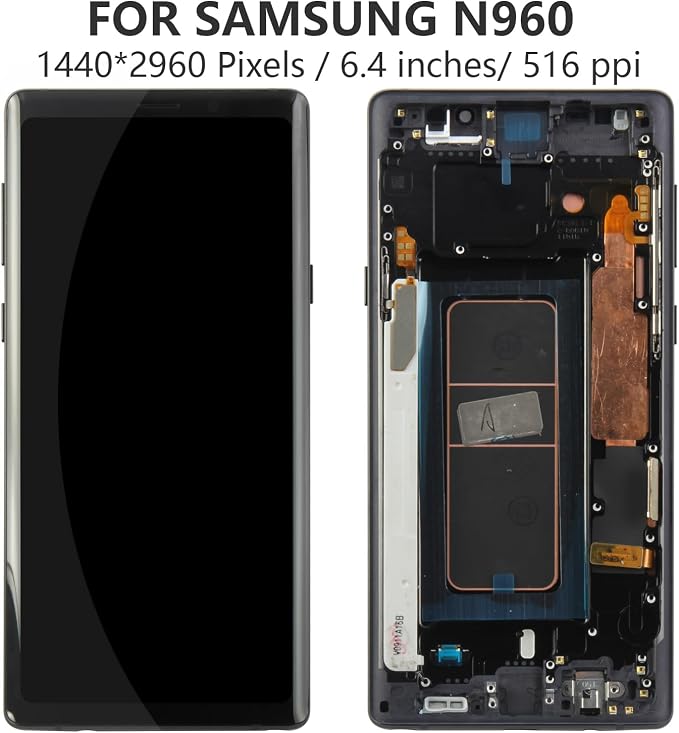
OLED for Samsung Galaxy Note 9 Screen Replacement LCD Display Touch Screen for N960 SM-N960F, SM-N9600, SM-N960F, SM-N960U Digitizer Assembly Replacement Repair Parts (Black with Frame, Small Size)
High Quality LCD Display Touch Screen Digitizer Assembly Glass Panel Replacement Kit for Samsung Galaxy Note9
OLED for Samsung Galaxy Note 9 Screen Replacement LCD Display Touch Screen for N960 SM-N960F, SM-N9600, SM-N960F, SM-N960U Digitizer Assembly Replacement Repair Parts (Black with Frame, Small Size)
Item #: 78411685

OLED for Samsung Galaxy Note 9 Screen Replacement LCD Display Touch Screen for N960 SM-N960F, SM-N9600, SM-N960F, SM-N960U Digitizer Assembly

Item #: 78411685

XCD 449

Price Details

Excluding Shipping & Custom charges ( Shipping and custom charges will be calculated on checkout )

*All items will import from US

0 ratings Write a review
In stock
us Imported from USA store

QTY:

Order now and get it around Tuesday, July 21
Our Top Logistics Partners
  • fedex
  • dhl
High Quality LCD Display Touch Screen Digitizer Assembly Glass Panel Replacement Kit for Samsung Galaxy Note9
U-Care Warranty:
None
Select a Plan
fast shipping

Fast
Shipping

free return

Free
Return*

secure packaging

Secure Packaging

100% original products

100% Original Products

pci-dss

PCI DSS Compliance

iso certified

ISO 27001 Certified


paypal payment
visa payment
mastercard payment
Note: Step Down Voltage Transformer required for using electronics products of US store (110-120). Recommended power converters Buy Now.

What Stands Out

High-Quality OLED
Experience vibrant colors and deep blacks with the premium OLED display, providing an exceptional viewing experience that enhances multimedia and gaming on your Samsung Galaxy Note 9.
Complete Assembly
Designed as a full replacement assembly, this product includes the OLED display, touch screen, and frame, simplifying the repair process and ensuring a seamless integration with your device.
Compatibility Assurance
Engineered specifically for Galaxy Note 9 models SM-N960F, SM-N9600, and SM-N960U, ensuring a perfect fit and reliable performance without compatibility issues during replacement.

Product Details

Shop OLED for Samsung Galaxy Note 9 Screen Replacement LCD Display Touch Screen for N960 SM-N960F, SM-N9600, SM-N960F, SM-N960U Digitizer Assembly Replacement Repair Parts (Black with Frame, Small Size) online at a best price in Grenada. B0C6XV4KVL
Item Weight0.3 lbs (140 grams)

Who Should Buy?

Suitable For
  • DIY Repair Enthusiasts

    Users who enjoy fixing their devices and prefer to save money by replacing screens themselves will find this product ideal.

  • Budget-Conscious Users

    Users looking to repair their Samsung Galaxy Note 9 economically without spending much on professional repair services.

  • Galaxy Note 9 Owners

    Users with a damaged screen on their Samsung Galaxy Note 9 needing a high-quality replacement to restore functionality.

Not Suitable For
  • Non-Technical Users

    Individuals with limited technical skills may struggle with installation and could cause further damage to their devices.

  • Warranty Seekers

    Users still under warranty for their device might void it by replacing the screen themselves without professional assistance.

  • Heavy Users

    Frequent users who heavily rely on their device should consider professional repairs for guaranteed quality and reliability.

Product Description

OLED for Samsung Galaxy Note 9 Screen Replacement LCD Display Touch Screen for N960 SM-N960F, SM-N9600, SM-N960F, SM-N960U Digitizer Assembly Replacement Repair Parts (Black with Frame, Small Size)

Have any Query? Chat with us

Customer Questions & Answers

  • Question: What is OLED technology and how does it benefit the Samsung Galaxy Note 9?

    Answer: OLED, or Organic Light Emitting Diode, technology provides vibrant colors, deep blacks, and excellent contrast compared to traditional LCDs. For the Samsung Galaxy Note 9, this means an enhanced display experience that allows for more vivid visuals and greater energy efficiency while viewing content. Users will notice richer graphics during gaming, clearer images when watching videos, and improved battery performance due to the way OLED displays utilize power.
  • Question: How do I know if my Samsung Galaxy Note 9 needs a screen replacement?

    Answer: Indicators that your Samsung Galaxy Note 9 may require a screen replacement include visible cracks, unresponsive touch functionality, dead pixels, or discoloration on the screen. Additionally, if you encounter flickering or consistent screen glitches, these are signs that the display may be compromised. It is advisable to assess these conditions to determine if a replacement is necessary for optimal functionality.
  • Question: Can I replace the screen on my Samsung Galaxy Note 9 myself?

    Answer: Yes, replacing the screen on your Samsung Galaxy Note 9 can be done by yourself if you possess the necessary tools and skills. Many users opt for DIY repairs using replacement kits that include tools and guides. However, this process requires careful handling to avoid further damage. Always ensure to follow detailed instructions, and watch tutorial videos available online for the best results.
  • Question: What tools will I need to replace the Samsung Galaxy Note 9 screen?

    Answer: To replace the screen on your Samsung Galaxy Note 9, you will typically need a heat gun or hairdryer, precision screwdriver set, plastic spudger tools, and, if available, an adhesive removal tool. These tools help you safely disassemble the device, remove the old screen, and install the new one efficiently. Having the appropriate tools will help streamline the entire replacement process.
  • Question: Is the OLED display compatible with all Galaxy Note 9 models?

    Answer: The OLED display replacement is specifically designed to be compatible with several models of the Galaxy Note 9, including N960 SM-N960F, SM-N9600, SM-N960F, and SM-N960U. It's essential to check your device model before purchasing to ensure you get the correct display. Using the right part guarantees proper fitting and functionality after the replacement is completed.
  • Question: Will I need to recalibrate my screen after replacing it?

    Answer: Generally, after replacing the Samsung Galaxy Note 9 screen, recalibration should not be necessary as the device's settings typically adapt to the new display automatically. However, if you notice issues with touch sensitivity or color output, you can check your display settings or utilize calibration apps available in the Play Store to adjust as needed for optimal performance.
  • Question: How long does it take to replace the Samsung Galaxy Note 9 screen?

    Answer: The time required to replace the Samsung Galaxy Note 9 screen can vary based on experience, generally ranging from 30 minutes to a few hours. An experienced technician may complete the process quickly, while beginners might take longer due to the need for careful handling and following instructions. Taking your time can help avoid mistakes that may lead to additional damage.
  • Question: What precautions should I take during the screen replacement?

    Answer: During the screen replacement of your Samsung Galaxy Note 9, ensure to work in a clean, static-free environment. Ground yourself to avoid static electricity damage to the internal components. Avoid rushing through the disassembly, as this may lead to accidental damage to other parts. Additionally, keep all screws organized to ensure a smooth reassembly process.
  • Question: Where can I buy OLED for Samsung Galaxy Note 9 Screen Replacement in Grenada?

    Answer: You can buy the OLED for Samsung Galaxy Note 9 Screen Replacement LCD Display Touch Screen at Ubuy in Grenada. Ubuy offers a wide selection of replacement parts, ensuring that you receive quality components for your repair needs. Additionally, they provide details and specifications about the product, allowing you to make an informed purchase for your Samsung Galaxy Note 9.
  • Question: Are there any specific care tips for my new OLED screen after replacement?

    Answer: After replacing your Samsung Galaxy Note 9 screen with an OLED display, it's crucial to handle the device carefully. Use a screen protector to prevent scratches and impacts. Avoid exposing your phone to extreme temperatures, as OLED displays can be sensitive to heat. Regularly clean the screen with a microfiber cloth to maintain clarity, ensuring that your display remains in pristine condition.

A-MIND Screens Editorial Review

No editorial reviews found

Customer Reviews & Ratings

5.0
1 customers ratings
  • 5 Star
    100%
  • 4 Star
    0%
  • 3 Star
    0%
  • 2 Star
    0%
  • 1 Star
    0%

Review this product

Share your thoughts with other customers

Product Price History

Important information

  • Limitations : For products shipped internationally, please note that any manufacturer warranty may not be valid; manufacturer service options may not be available; product manuals, instructions, and safety warnings may not be in destination country languages; the products (and accompanying materials) may not be designed in accordance with destination country standards, specifications, and labeling requirements; and the products may not conform to destination country voltage and other electrical standards (requiring use of an adapter or converter if appropriate). The recipient is responsible for assuring that the product can be lawfully imported to the destination country. When ordering from Ubuy or its affiliates, the recipient is the importer of record and must comply with all laws and regulations of the destination country.
  • Not all the products listed on Ubuy are for sale, as Ubuy is a global search engine. Products are subject to export/trade regulations.