- Home Page /
- Mobile Phone Accessories /
- Accessories /
- Maintenance, Upkeep & Repairs /
- Replacement Parts /
- Screens /
- SOMEFUN LCD Screen Replacement for Huawei Y9s...
0 ratings

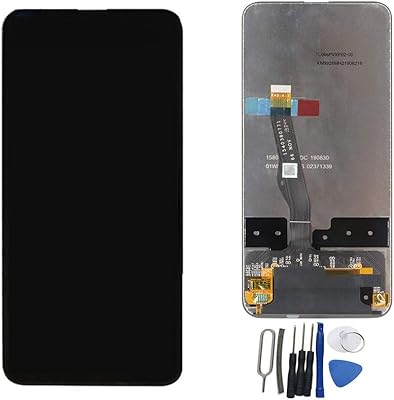
SOMEFUN LCD Screen Replacement for Huawei Y9s STK-L21 STK-LX3 STK-L22 6.59 Display Digitizer Touch Screen Glass Panel Assembly Black no Frame
0 ratings
Write a review
Out of stock
 Imported from USA store
Secured transaction
Ubuy works hard to protect your security and privacy. Our advanced payment security system ensures confidentiality by encrypting your information during transmission using AES (Advanced Encryption Standards) and SSL (Secure Socket Layer) protocols. Your payment details are 100% secure as we do not share your payment details with third party sellers.
Our Top Logistics Partners


Profesional technician is needed for installation

Fast
Shipping

Free
Return*

Secure Packaging

100% Original Products

PCI DSS Compliance

ISO 27001 Certified


Note: Step Down Voltage Transformer required for using electronics products of US store (110-120). Recommended power converters Buy Now.


What Stands Out
High-Quality Display
Experience vibrant visuals with a premium LCD screen that enhances color accuracy and clarity, offering an impressive viewing experience for games and videos on the Huawei Y9s.
Easy Installation
Designed for straightforward replacement, this screen assembly allows users to quickly restore their Huawei Y9s' functionality without professional help, saving both time and repair costs.
Durable Construction
Crafted from high-grade materials, this screen replacement ensures enhanced durability and resistance to scratches, providing long-lasting quality for everyday use and protecting your investment.
Product Details
| Item Weight | 0.3 lbs (140 grams) |
Who Should Buy?

-
DIY Repair Enthusiasts
Ideal for users who prefer to fix their devices themselves, saving on repair costs and gaining hands-on experience.
-
Cost-Conscious Users
Great option for budget-minded individuals needing a display replacement without the high costs of professional repairs.
-
Huawei Y9s Owners
Perfect for owners of Huawei Y9s models requiring a replacement screen, ensuring compatibility and correct fit.

-
Professional Technicians
May not meet the quality standards of professional repair shops needing high-grade components for reliability.
-
Non-Technical Users
Not suitable for users lacking technical skills, as installation may require specific tools and knowledge.
-
Complete Phone Replacement
Not ideal for those looking for a new phone altogether, as this is just a screen replacement component.
Product Description
SOMEFUN LCD Screen Replacement for Huawei Y9s STK-L21 STK-LX3 STK-L22 6.59 Display Digitizer Touch Screen Glass Panel Assembly Black no Frame
Have any Query? Chat with us
Customer Questions & Answers
-
Question:
What models are compatible with this LCD screen replacement?
Answer: This LCD screen replacement is specifically designed for the Huawei Y9s models, including STK-L21, STK-LX3, and STK-L22. Each model has unique specifications, and this replacement part ensures a perfect fit. Always verify your device model before purchase to avoid compatibility issues. -
Question:
What does 'no frame' mean in the product description?
Answer: The term 'no frame' indicates that the LCD screen replacement does not come with a pre-attached frame. This means you will need to transfer the existing frame from your original screen or purchase it separately. This option can be beneficial if you're looking to keep the device's original frame aesthetics. -
Question:
How can I install the LCD screen replacement?
Answer: Installation of the LCD screen replacement can be done using a few tools, such as a plastic prying tool and screwdrivers. You will need to open the device carefully, disconnect the old screen, and then connect the new one. If you're inexperienced, it's recommended to follow a guide or consult a professional technician to avoid damaging your device. -
Question:
Is there a difference between an original and a third-party LCD screen replacement?
Answer: Yes, there can be significant differences between original and third-party LCD screen replacements. Original parts are manufactured by Huawei and are built to meet the company's quality standards. Third-party screens may vary in color accuracy, touch sensitivity, and overall durability. It's essential to choose a replacement that comes from a reputable supplier to ensure optimal performance. -
Question:
What should I check before purchasing a new LCD screen?
Answer: Before making a purchase, ensure that the screen replacement is guaranteed to be compatible with your device's model (STK-L21, STK-LX3, STK-L22). Additionally, check customer reviews and ratings to gain insights into the quality and reliability of the product. It's also wise to consider the source of purchase to avoid counterfeit products. -
Question:
Can I use my phone while waiting for the new screen replacement?
Answer: If your current LCD screen is still functional but damaged, you may be able to continue using your phone with caution. Just be aware that compromises in visibility or touch response could hinder usability. However, if the screen is severely cracked or unresponsive, it’s advisable to avoid using the device to prevent further damage. -
Question:
What tools do I need to replace the LCD screen?
Answer: To replace the LCD screen, essential tools include a heat gun or hair dryer to soften adhesive, plastic prying tools to open the device, and precision screwdrivers to remove screws. Some kits may come with these tools, making it more convenient to perform the replacement. Ensuring you have the right tools beforehand can streamline the process. -
Question:
How do I know if I need a new digitizer as well?
Answer: If your touch screen is unresponsive, flickering, or showing signs of display issues, you may need to replace the digitizer along with the LCD. The digitizer is responsible for touch functionality; hence issues with touch response often indicate that it is malfunctioning. Replacing both can resolve these touchscreen problems effectively. -
Question:
What are the signs that my screen is damaged?
Answer: Signs of a damaged screen include cracks or scratches on the glass, discoloration or black spots on the display, unresponsive touch areas, or flickering screens. If you experience any of these issues, it is a good idea to consider a screen replacement to ensure optimal performance and usability of your device. -
Question:
Where can I buy LCD Screen Replacement for Huawei Y9s STK-L21 STK-LX3 STK-L22 6.59 Display Digitizer Touch Screen Glass Panel Assembly Black no Frame in Grenada?
Answer: You can conveniently buy the LCD Screen Replacement for Huawei Y9s STK-L21, STK-LX3, STK-L22 from Ubuy in Grenada. Ubuy offers a wide selection of replacement parts and accessories, ensuring that you can find the right products for your needs while enjoying a reliable shopping experience.
SOMEFUN Screens Editorial Review
No editorial reviews found
Customer Reviews & Ratings
1 customers ratings
-
5 Star
100%
-
4 Star
0%
-
3 Star
0%
-
2 Star
0%
-
1 Star
0%
Review this product
Share your thoughts with other customers
Pros
- High display quality
- Easy installation
- Responsive touch
- Accurate color reproduction
- Durable construction
Cons
- Limited color options
Product Price History
Important information
- Limitations : For products shipped internationally, please note that any manufacturer warranty may not be valid; manufacturer service options may not be available; product manuals, instructions, and safety warnings may not be in destination country languages; the products (and accompanying materials) may not be designed in accordance with destination country standards, specifications, and labeling requirements; and the products may not conform to destination country voltage and other electrical standards (requiring use of an adapter or converter if appropriate). The recipient is responsible for assuring that the product can be lawfully imported to the destination country. When ordering from Ubuy or its affiliates, the recipient is the importer of record and must comply with all laws and regulations of the destination country.
- Not all the products listed on Ubuy are for sale, as Ubuy is a global search engine. Products are subject to export/trade regulations.
Currently unavailable.
We don't know when or if this item will be back in stock.
This item is not restrict in my country.(Please click on above link if this item is not restrict in your country, So our team will review and allow.)
Secured transaction
Ubuy works hard to protect your security and privacy. Our advanced payment security system ensures confidentiality by encrypting your information during transmission using AES (Advanced Encryption Standards) and SSL (Secure Socket Layer) protocols. Your payment details are 100% secure as we do not share your payment details with third party sellers.
Our Top Logistics Partners
Fastest cross-border delivery
Features & Benefits
- Profesional technician is needed for installation
- Test the item received before installation
- Do not remove protective film or tags when testing
- Clean the flex cable and slot of the motherboard before test
- Connect new screen tightly to the motherboard
- Contact us if there are any issues or doubts