- Home Page /
- Electronics /
- Computer Accessories /
- Computer Accessories & Peripherals /
- Computer Cable Adapters /
- DVI-HDMI Adapters /
- HDMI 2.1 4K EDID Emulator (Model: 4K-EWB), Su...
0 ratings


Item #:
89316281
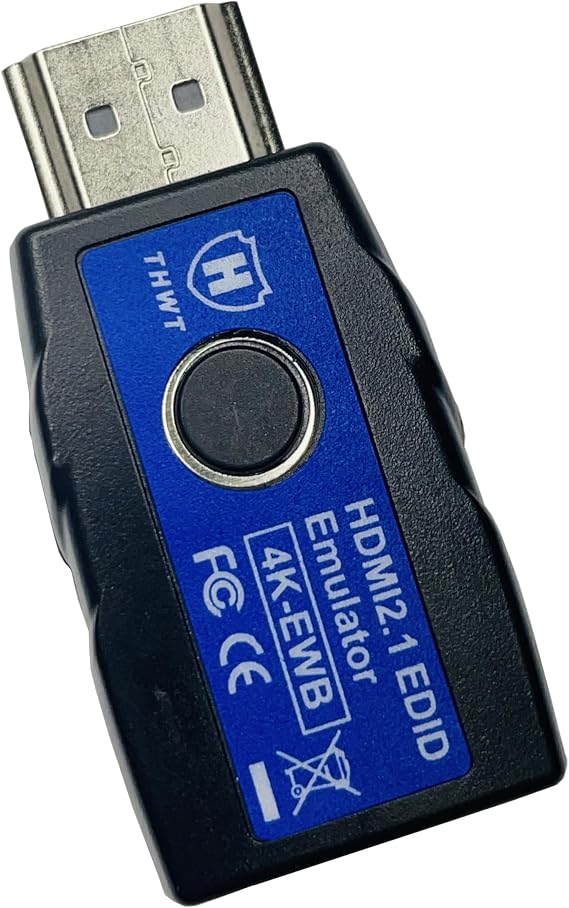
HDMI 2.1 4K EDID Emulator (Model: 4K-EWB), Supports SCDC and EDID Copying and Emulation, HDCP Pass-Through (not Bypass), Pre-Set EDIDs are 4K@60Hz
Item #:
89316281
XCD 113
Price Details
Excluding Shipping & Custom charges ( Shipping and custom charges will be calculated on checkout )
*All items will import from US
0 ratings
Write a review
In stock
 Imported from USA store
Order now and get it around Monday, August 17
Secured transaction
Ubuy works hard to protect your security and privacy. Our advanced payment security system ensures confidentiality by encrypting your information during transmission using AES (Advanced Encryption Standards) and SSL (Secure Socket Layer) protocols. Your payment details are 100% secure as we do not share your payment details with third party sellers.
Our Top Logistics Partners


HANWELL Technology consistently exceeds our clients’ expectations with excellent product quality and perpetual service.

Fast
Shipping

Free
Return*

Secure Packaging

100% Original Products

PCI DSS Compliance

ISO 27001 Certified


Note: Step Down Voltage Transformer required for using electronics products of US store (110-120). Recommended power converters Buy Now.


What Stands Out
Advanced EDID Support
The 4K-EWB offers robust EDID copying and emulation capabilities, enabling seamless connectivity with 4K devices, ensuring optimal video quality and user experience without disruption.
High Refresh Rates
With support for 4K@60Hz 4:4:4 and 4K@120Hz 4:2:0, this emulator ensures smooth visuals for gaming and streaming, catering to high-demand users seeking top-tier performance.
Reliable HDCP Pass-Through
Maintaining HDCP encryption without bypass ensures copyright protection for content, making it a preferred choice for users needing compliance in professional and entertainment settings.
Product Details
| Compatible Devices | HDMI Monitor, HDMI Video Card |
| Specific Uses For Product | Monitor,Projector |
| Connector Type | HDMI |
| Number of Ports | 1 |
| Input Voltage | 5 volts |
| Power Plug Type | No Plug |
| Color | Black |
| Finish | Hdmi |
| Item Dimensions | 1.89 x 0.94 x 0.51 inches (4.8 x 2.4 x 1.3 cm) |
| Item Weight | 10 g |
| Package Quantity | 1 |
| Unit Count | 1 Count |
| Number of Items | 1 |
| Brand | THWT |
| Model Number | 4K-EWB |
| Manufacturer | THWT |
| Mfr Part Number | 4K-EWB |
| Item dimensions L x W x H | 1.89 x 0.94 x 0.51 inches (4.8 x 2.4 x 1.3 cm) |
Who Should Buy?

-
Gamers
Ideal for gamers needing high-resolution support at 120Hz for smooth gameplay and competitive advantage.
-
AV Enthusiasts
Perfect for audio-visual enthusiasts desiring reliable HDCP pass-through and excellent video quality at high resolutions.
-
Pro Video Editors
Beneficial for professionals needing precise EDID management for accurate color grading and video editing workflows.

-
Casual Users
Not suitable for casual users who don’t require advanced features like SCDC or high-resolution support.
Product Description
HDMI 2.1 4K EDID Emulator (Model: 4K-EWB), Supports SCDC and EDID Copying and Emulation, HDCP Pass-Through (not Bypass), Pre-Set EDIDs are 4K@60Hz 4:4:4 and 4K@120Hz 4:2:0 with 2.1 Channel Audio
Have any Query? Chat with us
Customer Questions & Answers
-
Question:
What is the HDMI 2.1 4K EDID Emulator Model: 4K-EWB used for?
Answer: The HDMI 2.1 4K EDID Emulator Model: 4K-EWB is primarily used to facilitate the connection between a source device, like a gaming console or Blu-ray player, and a display, ensuring optimal video quality. This device supports advanced features like SCDC and EDID copying and emulation, which help maintain compatibility and enhance overall visual performance. For instance, if your display is not recognizing the source, the emulator can establish a stable connection, allowing for uninterrupted gameplay or media playback at 4K@60Hz 4:4:4 resolution. -
Question:
What are the benefits of using the 4K-EWB EDID Emulator?
Answer: The 4K-EWB EDID Emulator provides several benefits, including enhanced compatibility between devices and the ability to transmit high-quality video and audio signals without degradation. By using EDID emulation, it prevents issues like screen flickering or artifacting, which can occur when devices do not communicate effectively. Users can particularly benefit during setup in professional AV environments or home theaters, ensuring that their displays exhibit the best quality and performance without interruptions. -
Question:
Does the 4K-EWB support HDCP pass-through?
Answer: Yes, the 4K-EWB supports HDCP pass-through, ensuring that High-bandwidth Digital Content Protection is maintained during transmission. This is crucial when playing protected content from devices that require HDCP compliance, such as streaming services and Blu-ray players. By supporting HDCP pass-through and not bypassing it, users can enjoy protected high-definition content without worrying about playback issues, making it an excellent choice for both home and professional use. -
Question:
Can the 4K-EWB be used with older HDMI devices?
Answer: Yes, while the 4K-EWB is designed for HDMI 2.1, it is backward compatible with older HDMI standards. This means you can connect it with devices that use HDMI 2.0 or earlier versions, albeit the performance will be limited to the capabilities of the older device. It’s perfect for upgrading older systems without needing to replace all components. Users often find this useful for integrating new technology into existing setups seamlessly. -
Question:
What resolutions does the 4K-EWB support?
Answer: The HDMI 2.1 4K EDID Emulator supports resolutions up to 4K@60Hz with 4:4:4 chroma sub-sampling. This high standard ensures that users receive crystal-clear images and vibrant colors suitable for gaming, streaming, and presentations. The 4K resolution helps provide an immersive experience, particularly when viewing high-definition content or playing graphically demanding video games, making it ideal for audiophiles and technology enthusiasts alike. -
Question:
How does EDID copying work with the 4K-EWB?
Answer: EDID copying enables the 4K-EWB to read and store specific display capabilities from the connected display device. When you plug in your display, the emulator copies its EDID settings, allowing the source device to send the optimum video resolution and format. This feature is particularly helpful in setups with multiple HDMI sources, offering smoother transitions between devices without needing manual adjustments, which can sometimes impede a user’s experience. -
Question:
Is the 4K-EWB suitable for gaming consoles?
Answer: Absolutely! The 4K-EWB is an excellent choice for gaming consoles, especially those that support 4K gaming, such as PlayStation 5 and Xbox Series X. It ensures that the console can deliver the highest quality graphics and performance with minimal latency. Gamers can appreciate features like 4:4:4 chroma subsampling and seamless HDCP pass-through, which can enhance their gaming experience by providing sharper images and smoother gameplay. -
Question:
What does SCDC support mean?
Answer: SCDC stands for Seamless Changing Data Channel, which is a feature that allows for better data integrity and ensures that video resolutions and audio formats can be changed without interruption. With SCDC support, the 4K-EWB can maintain a steady transmission of audio and video signals when switching between different resolutions or refresh rates, making it particularly useful for dynamic environments, such as gaming or multi-source AV setups, where changes may occur frequently. -
Question:
Where can I buy the HDMI 2.1 4K EDID Emulator Model: 4K-EWB?
Answer: You can buy the HDMI 2.1 4K EDID Emulator Model: 4K-EWB from Ubuy, which offers a wide selection of electronic and tech products. Ubuy provides a user-friendly shopping experience with detailed product descriptions and specifications, making it easier for you to find exactly what you need for your audio-visual setup. Always check product availability on Ubuy to ensure you get your hands on the latest technology options. -
Question:
What kind of cables do I need to use with the 4K-EWB?
Answer: To fully utilize the features of the 4K-EWB, you will need high-speed HDMI cables that support HDMI 2.1 specifications. These cables are designed to handle higher data rates necessary for 4K@60Hz video output and support additional features like HDR and audio return channels. Ensuring you have the right cable is essential for achieving optimal performance and preventing signal degradation, which is crucial for high-resolution displays and immersive content experiences.
THWT DVI-HDMI Adapters 4K-EWB Editorial Review
### Editorial Review The EDID (Extended Display Identification Data) emulator has garnered a mix of satisfaction and frustration among users, mainly depending on their specific configurations and requirements. Many users report a significant improvement in functionality that directly addresses the handshake issues often encountered when connecting PCs to AV receivers and TVs. For instance, one user was able to successfully resolve EDID handshake issues on their HTPC setup, gaining access to high-fidelity surround sound and stable 4K video without needing to invest in a new AVR. This success emphasizes the product's efficacy in retaining and presenting a monitor's EDID, which has proven beneficial, especially for users employing KVM switches or using remote access setups. However, the product is not without its limitations. Some users have experienced challenges with fiber-based HDMI cables and found that default presets do not support HDR. The process of cloning an OLED TV’s EDID did not yield satisfactory results for one user, indicating that while the emulator can handle certain situations well, it may fall short in others, particularly in setups demanding HDR capabilities or high refresh rates. Unclear instructions added to some users' frustrations, although experimentation led many to understand the device's functions over time. Overall, the EDID emulator is highly recommended for users looking to maintain Consistent digital connection settings, especially in multi-device environments. Its practical application shines in resolving common video output issues, making it a worthy investment for those who require stability in their visual setups. ### Pros and Cons **
Customer Reviews & Ratings
1 customers ratings
-
5 Star
100%
-
4 Star
0%
-
3 Star
0%
-
2 Star
0%
-
1 Star
0%
Review this product
Share your thoughts with other customers
Pros
- Allows for high-fidelity surround sound and stable 4K output.
- User-friendly once basic functionality is understood.
- Supports multiple modes (pass-through, default, and handshake).
- Useful for remote access and multi-PC setups.
Cons
- Limited functionality with fiber-based HDMI cables.
Platform Trust & Buyer Confidence

MA
Mohammad
Verified buyer
“Excellent quality and original too,when ubuy send original things I will appreciate that ,I very satisfied thank you”
23 July 2026 · via Trustpilot
CK
Chitra
Verified buyer
“The order and delivery progress was communicated very well. Package arrived within the estimated time. Products arrived as expected in good condition.”
22-Jul-26 · via Trustpilot
K
kund
Verified buyer
“Good supply of products. Safe payment methods, and shipment worldwide! Genuine products.”
23-Jul-26 · via Trustpilot
OO
Onesi
Verified buyer
“Was my first time buying a product from Ubuy, but I found it so helpful. This is reliable. Gonna place a new order!”
22 July 2026 · via Trustpilot
SJ
SAO JOHN
Verified buyer
“Ubuy is a great online platform to buy stuff. Reliable, fast delivery time and great value for money. I've been using Ubuy online shopping platform for three years now and will continue to do so.”
23 July 2026 · via Trustpilot
Secure Checkout
Global Delivery
Easy Returns
Genuine Products
Product Price History
Important information
- Limitations : For products shipped internationally, please note that any manufacturer warranty may not be valid; manufacturer service options may not be available; product manuals, instructions, and safety warnings may not be in destination country languages; the products (and accompanying materials) may not be designed in accordance with destination country standards, specifications, and labeling requirements; and the products may not conform to destination country voltage and other electrical standards (requiring use of an adapter or converter if appropriate). The recipient is responsible for assuring that the product can be lawfully imported to the destination country. When ordering from Ubuy or its affiliates, the recipient is the importer of record and must comply with all laws and regulations of the destination country.
- Not all the products listed on Ubuy are for sale, as Ubuy is a global search engine. Products are subject to export/trade regulations.
XCD 113
Order now and get it around Monday, August 17
This item is not restrict in my country.(Please click on above link if this item is not restrict in your country, So our team will review and allow.)
QTY:
Secured transaction
PCI DSS compliant and ISO 27001:2022 certified, with encrypted payments and full buyer protection on every order.
Our Top Logistics Partners
Fastest cross-border delivery
Features & Benefits
- Leading manufacturer specialized in remote connectivity solutions.
- Supports a wide range of video and audio formats through EDID emulation.
- Compatible with HDMI 2.1 and adheres to HDCP standards.
- Easily switch EDID settings with a single button press.
- Bi-directional design for versatile installation options.
- No external power supply needed for operation.
Ubuy Assurance
Experience worry-free shopping with 100% original products, PCI DSS-compliant payment security, ISO 27001-certified data protection, the fastest cross-border delivery, free returns *, and secure packaging on every order.