0 ratings

Item #:
133255119
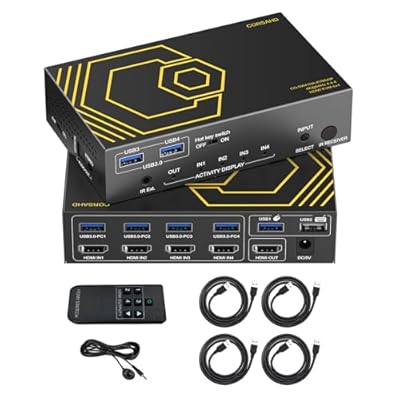
HDMI KVM Switch USB 3.0 4 Ports with Hotkey 4K 60Hz 18Gbps Share 4 Computers with one Keyboard Mous HDR D-olby Vision HDCP2.2 Remote Control USB3.0
Item #:
133255119
XCD 484
Price Details
Excluding Shipping & Custom charges ( Shipping and custom charges will be calculated on checkout )
*All items will import from US
0 ratings
Write a review
In stock
 Imported from USA store
QTY:
Order now and get it around Wednesday, July 08
Secured transaction
Ubuy works hard to protect your security and privacy. Our advanced payment security system ensures confidentiality by encrypting your information during transmission using AES (Advanced Encryption Standards) and SSL (Secure Socket Layer) protocols. Your payment details are 100% secure as we do not share your payment details with third party sellers.
Our Top Logistics Partners


Control 4 computers with one set of controls and enjoy high-resolution displays with our HDMI KVM Switch USB3.0!

Fast
Shipping

Free
Return*

Secure Packaging

100% Original Products

PCI DSS Compliance

ISO 27001 Certified


Note: Step Down Voltage Transformer required for using electronics products of US store (110-120). Recommended power converters Buy Now.


What Stands Out
4-Port Connectivity
Effortlessly switch between four computers using one keyboard and mouse, enhancing productivity and reducing desktop clutter.
4K Resolution Support
Enjoy stunning visuals with 4K at 60Hz resolution, perfect for gamers and professionals requiring high-definition performance.
Hotkey Functionality
Quickly toggle between devices using hotkeys, streamlining workflow and making transitions seamless for users.
Product Details
| Item Weight | 1.5 lbs (680 grams) |
Who Should Buy?

-
Gamers
Easily switch between multiple gaming setups without any hassle, maintaining high resolutions and refresh rates.
-
Content Creators
Streamline workflow by managing multiple computers for video editing and streaming on a single display.
-
Office Use
Ideal for professionals who wish to switch between workstations seamlessly, enhancing productivity in a multi-PC environment.

-
Casual Users
Occasional users may find the complexity unnecessary and better suited with simpler switch options.
-
Low Resolution Needs
Users who don't require high resolutions or refresh rates might not utilize its full potential.
-
Single PC Setup
Not ideal for those with only one computer, as it offers features beyond what is necessary.
Product Description
HDMI KVM Switch USB 3.0 4 Ports with Hotkey 4K 60Hz 18Gbps Share 4 Computers with one Keyboard Mous HDR D-olby Vision HDCP2.2 Remote Control USB3.0 CableX4
Have any Query? Chat with us
Customer Questions & Answers
-
Question:
What is an HDMI KVM Switch and how does it work?
Answer: An HDMI KVM Switch allows you to control multiple computers using a single keyboard, mouse, and monitor setup. By connecting your computers to the KVM switch through HDMI cables, you can easily switch control between them, either via hotkey commands or a remote control. This functionality is particularly useful in environments where space is limited, or when managing servers or media production setups. For instance, if you work with multiple machines for graphic design, this switch simplifies your workflow by reducing clutter. -
Question:
What resolution does the HDMI KVM Switch support?
Answer: The HDMI KVM Switch supports up to 4K resolution at 60Hz, ensuring high-definition image clarity and seamless video playback. This capability is essential for users who require detail and precision, such as graphic designers, gamers, or video editors. With its 18Gbps bandwidth, you can enjoy vibrant colors and clear visuals, perfect for any high-performance tasks or entertainment. Whether streaming a 4K movie or playing a visually demanding game, this switch enhances your viewing experience. -
Question:
How do I switch between computers using the HDMI KVM Switch?
Answer: Switching between computers is made seamless with the HDMI KVM Switch through the use of a hotkey function on your keyboard or via a user-friendly remote control. Simply press the designated hotkey combination or use the remote to toggle between connected machines. This feature is particularly advantageous during multitasking sessions where you might need to quickly access different systems without fumbling with cables. It streamlines your routine, enabling a smooth and efficient transition between tasks. -
Question:
Is the HDMI KVM Switch compatible with all computer operating systems?
Answer: Yes, the HDMI KVM Switch is designed to be universally compatible with various operating systems, including Windows, macOS, and Linux. This versatility means you can connect devices running different platforms without concern. It's an excellent choice for users who manage a diverse range of computers in environments such as software development, IT management, or home offices. This helps you maintain flexibility in your workflow while easily sharing peripherals. -
Question:
What is the purpose of the USB 3.0 ports on the KVM Switch?
Answer: The USB 3.0 ports on the KVM Switch allow for high-speed data transfer between connected devices, including peripherals like printers, external drives, and webcams. With USB 3.0, users experience transfer rates significantly faster than previous USB versions, enhancing productivity in data-intensive tasks. For example, if you are transferring large files or need to use a high-resolution webcam for video calls, the USB 3.0 ports ensure that all connected devices operate efficiently and without lag. -
Question:
What is hotkey switching and how does it enhance user experience?
Answer: Hotkey switching allows users to change between connected computers using specific keyboard commands, making it a quick and efficient way to manage multiple systems. This method enhances user experience by minimizing physical interaction with the switch device and streamlining workflow. For instance, if you're working on coding tasks across different operating systems, hotkey switching allows you to switch back and forth without interrupting your thought process, significantly boosting productivity. -
Question:
What are the advantages of having remote control functionality?
Answer: Having a remote control for your HDMI KVM Switch offers convenience and ease of use, allowing you to switch devices without needing to maneuver around your workstation. This feature is particularly beneficial in setups where the switch is not physically accessible. For instance, if you have a multi-monitor setup in a corporate environment or a home theater system, the remote control lets you seamlessly toggle between systems from a distance, creating a more elegant and user-friendly arrangement. -
Question:
Can I use the KVM Switch for gaming purposes?
Answer: Absolutely! The HDMI KVM Switch is excellent for gaming, especially with its support for 4K 60Hz output. Gamers can connect multiple consoles or PCs to the switch and enjoy high-definition gaming experiences with minimal latency. Additionally, the ability to use a single set of peripherals makes it an ideal choice for gamers who want to switch between different gaming systems without hassle. For instance, you could easily toggle between a gaming PC and a PlayStation setup. -
Question:
Is the HDMI KVM Switch portable?
Answer: The HDMI KVM Switch is typically compact and lightweight, making it a suitable option for portability. Many professionals or creators who travel frequently for work find this aspect essential, as they can easily pack it alongside their devices. Its compact size ensures that you can maintain productivity on-the-go without sacrificing the ability to manage multiple computers. For example, it’s perfect for freelancers who work in different locations and require consistent access to various systems. -
Question:
Where can I buy HDMI KVM Switch USB 3.0 4 Ports with Hotkey 4K 60Hz?
Answer: You can purchase the HDMI KVM Switch USB 3.0 4 Ports with Hotkey 4K 60Hz at Ubuy in Grenada. Ubuy provides a reliable platform for various electronic gadgets and accessories, ensuring a satisfactory shopping experience. With Ubuy, you can easily find the latest technology products and enjoy the benefits of secure transactions and customer service support.
CORSAHD KVM Switches Editorial Review
The HDMI KVM Switch with USB 3.0 functionality and support for 4K resolution has garnered mixed reviews from customers who have utilized it in diverse setups. While many users appreciate the product for its capability to seamlessly switch between four computers using one keyboard and mouse, others have expressed concerns over certain functionalities, particularly when interfacing with Mac devices. On the positive side, customers have praised the KVM switch for its high-resolution support, which includes 4K at 60Hz, and for the convenience of having remote control functionality. Users who operate dual monitor setups find it effective, noting the quick recognition time when switching between devices as a significant plus. The compact design and included USB-A cables are also highlighted as beneficial for users looking to manage multiple computer setups in tight spaces. However, several users pointed out challenges with the setup instructions, describing them as somewhat confusing, particularly for those who may not have a technical background. Some users experienced functionality issues when using advanced keyboards or mice, noting that certain keys or shortcuts were not recognized correctly when the KVM switch was configured with "Hot Key" settings. Furthermore, the switching latency of several seconds during input changes has been cited as a potential frustration, especially for those who work across multiple devices frequently. In conclusion, while this KVM switch can significantly enhance productivity for users handling multiple computers, it may require a level of technical understanding to navigate its setup and fully utilize its capabilities. **
Customer Reviews & Ratings
1 customers ratings
-
5 Star
100%
-
4 Star
0%
-
3 Star
0%
-
2 Star
0%
-
1 Star
0%
Review this product
Share your thoughts with other customers
Pros
- Seamless switching between four computers
- Supports 4K at 60Hz with HDR/Dolby Vision
- Convenience of remote control
- Compact design perfect for tight spaces
- Includes USB-A cables
Cons
- Confusing setup instructions for non-tech-savvy users
Product Price History
Important information
- Limitations : For products shipped internationally, please note that any manufacturer warranty may not be valid; manufacturer service options may not be available; product manuals, instructions, and safety warnings may not be in destination country languages; the products (and accompanying materials) may not be designed in accordance with destination country standards, specifications, and labeling requirements; and the products may not conform to destination country voltage and other electrical standards (requiring use of an adapter or converter if appropriate). The recipient is responsible for assuring that the product can be lawfully imported to the destination country. When ordering from Ubuy or its affiliates, the recipient is the importer of record and must comply with all laws and regulations of the destination country.
- Not all the products listed on Ubuy are for sale, as Ubuy is a global search engine. Products are subject to export/trade regulations.
XCD 484
Order now and get it around Wednesday, July 08
This item is not restrict in my country.(Please click on above link if this item is not restrict in your country, So our team will review and allow.)
QTY:
Secured transaction
Ubuy works hard to protect your security and privacy. Our advanced payment security system ensures confidentiality by encrypting your information during transmission using AES (Advanced Encryption Standards) and SSL (Secure Socket Layer) protocols. Your payment details are 100% secure as we do not share your payment details with third party sellers.
Our Top Logistics Partners
Fastest cross-border delivery
Features & Benefits
- Manage 4 computers seamlessly with one mouse, keyboard, and display.
- Supports high-resolution output of 4K@60Hz for stunning visuals.
- Compatible with PCs, gaming consoles, and security systems across multiple operating systems.
- Offers versatile control via Hotkey, IR remote, or button switch.
- No power supply needed; easy plug-and-play setup.
- Supports advanced audio formats for an immersive sound experience.