- Home Page /
- Mobile Phone Accessories /
- Accessories /
- Stylus Pens /
- Stylus Pen for Microsoft Surface Pro12111098X76543Surfa...
0 ratings

Item #:
119431715
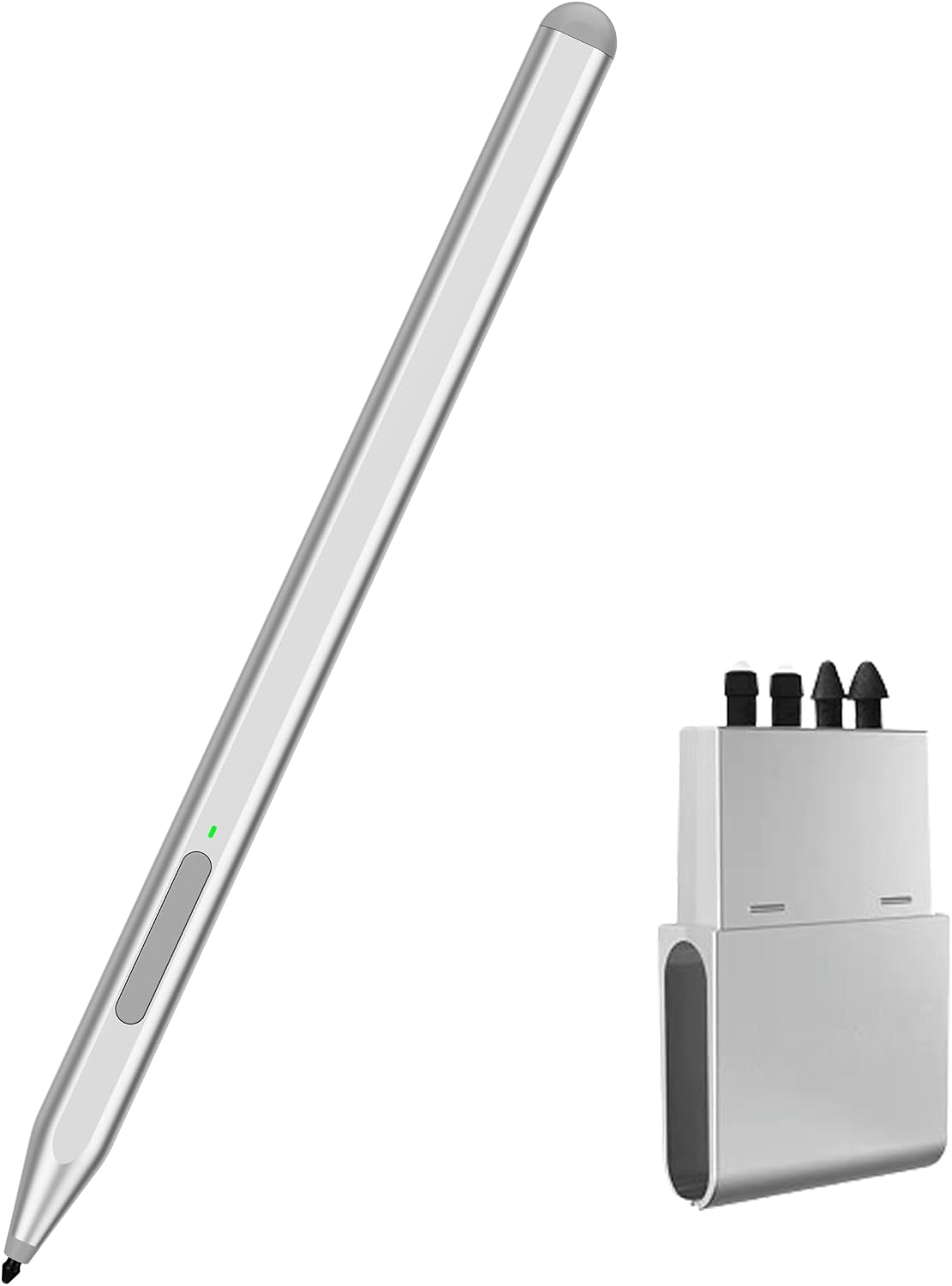
Stylus Pen for Microsoft Surface Pro12111098X76543Surface 3, Surface Go 321, Surface LaptopStudioBook 4321 with Eraser Side Button,Palm
Item #:
119431715
XCD 98
Price Details
Excluding Shipping & Custom charges ( Shipping and custom charges will be calculated on checkout )
*All items will import from US
0 ratings
Write a review
In stock
 Imported from USA store
QTY:
This product is not Fulfilled by Ubuy and can take minimum 10 days in delivery. We might cancel the product from the order and refund you if any issue arise with the delivery of this product.
Secured transaction
Ubuy works hard to protect your security and privacy. Our advanced payment security system ensures confidentiality by encrypting your information during transmission using AES (Advanced Encryption Standards) and SSL (Secure Socket Layer) protocols. Your payment details are 100% secure as we do not share your payment details with third party sellers.
Our Top Logistics Partners


Milikilo Surface Pen offers premium features like tilt sensitivity, palm rejection, and a fast-charging battery, perfect for professionals and creators.

Fast
Shipping

Free
Return*

Secure Packaging

100% Original Products

PCI DSS Compliance

ISO 27001 Certified


Note: Step Down Voltage Transformer required for using electronics products of US store (110-120). Recommended power converters Buy Now.


What Stands Out
Eraser Side Button
Easily toggle between writing and erasing with a convenient eraser side button to enhance productivity and create a seamless digital writing experience.
Palm Rejection
Advanced palm rejection technology allows for natural writing without interruptions, ensuring an effortless user experience while sketching, annotating, or taking notes.
Replacement Tips Included
Comes with four replacement tips, providing longevity and exceptional value, ensuring your stylus keeps performing at its best with minimal wear.
Product Details
| Item Weight | 0.2 lbs (90 grams) |
Who Should Buy?

-
Artists and Illustrators
Perfect for digital artists who need precision and control over their drawings and designs on Surface devices.
-
Students and Note-Takers
Ideal for students who take handwritten notes and require an ergonomic pen with enhanced functionality for learning.
-
Professionals in Design
Great for graphic designers and architects who require a reliable tool for sketching and detailed illustrations.

-
Casual Users
Not suitable for users who only occasionally use a stylus and prefer basic touch interactions on their devices.
-
Gaming Enthusiasts
Gamers looking for precise controls might not find this stylus effective compared to traditional game controllers.
-
Typing-Focused Users
Users who primarily use keyboards for typing may not benefit from the stylus features and may prefer traditional input methods.
Product Description
Stylus Pen for Microsoft Surface Pro12111098X76543Surface 3, Surface Go 321, Surface LaptopStudioBook 4321 with Eraser Side Button,Palm Rejection,Replacement Tips4 Packs
Have any Query? Chat with us
Customer Questions & Answers
-
Question:
What devices are compatible with the Stylus Pen for Microsoft Surface?
Answer: The Stylus Pen is compatible with a wide range of Microsoft Surface devices, including the Surface Pro series (Pro 11, 10, 9, 8, X, 7+, 6, 5, 4, 3), Surface 3, Surface Go (3, 2, 1), Surface Laptop (Studio, Book 4, 3, 2, 1). This compatibility ensures that you can utilize the pen's advanced features, such as pressure sensitivity and tilt functionality, across your various Surface devices for seamless note-taking, drawing, and navigating. -
Question:
Does the Stylus Pen have an eraser feature?
Answer: Yes, the Stylus Pen includes an eraser side, which allows you to effortlessly erase mistakes while you’re writing or drawing. This feature mimics the functionality of a traditional pencil eraser, providing intuitive control. You can quickly switch between writing and erasing without needing to select different tools on your device, making it an excellent choice for artists and students alike. -
Question:
How does the pressure sensitivity of the Stylus Pen work?
Answer: The Stylus Pen features advanced pressure sensitivity that enables you to create strokes of varying thickness based on how hard you press down while writing or drawing. This characteristic is perfect for artists who require precision in their work, as it allows for a natural drawing experience, akin to using a real brush or pencil. You can achieve delicate lines as well as bold strokes, enhancing your creative projects. -
Question:
Is the Stylus Pen rechargeable?
Answer: The Stylus Pen for Microsoft devices is designed with convenience in mind and typically employs a replaceable battery rather than being rechargeable. This approach enables extended usage with minimal downtime, as users can simply replace the battery when needed. This design is particularly useful in prolonged scenarios, such as drawing sessions or lengthy note-taking periods, ensuring that your work is never interrupted. -
Question:
Can I use the Stylus Pen for other applications apart from note-taking?
Answer: Absolutely! The Stylus Pen is versatile and can be used for a broad range of applications beyond note-taking, including graphic design, photo editing, and digital art. Creative professionals can benefit from its accurate precision and feel, while students can use it for annotations and interactive learning. Whether you are sketching your next masterpiece or marking up presentations, this stylus adapts to your needs. -
Question:
Do I need to install any software to use the Stylus Pen?
Answer: No additional software is necessary to use the Stylus Pen with your Microsoft Surface devices. The pen is plug-and-play and designed to work seamlessly with Windows Ink and various apps optimized for stylus input. This ensures that users can start writing or drawing right away without the hassle of installations, maximizing efficiency in daily tasks or creative endeavors. -
Question:
What is the weight of the Stylus Pen, and how does it affect usage?
Answer: The Stylus Pen is designed to be lightweight, which enhances comfort during extended use. Its balanced weight distribution allows for a more natural grip, reducing hand fatigue while you write or draw. This ergonomics make it an ideal companion for lengthy sessions, whether you are attending virtual classes, working on complex projects, or enjoying leisurely art creation. -
Question:
Are there different colors available for the Stylus Pen?
Answer: The Stylus Pen typically comes in various color options to match your style or device aesthetic. These options can help personalize your tech setup and allow you to express yourself through color choices. Whether you prefer a classic black or a vibrant shade, there is likely a color to suit your taste, adding a touch of individuality to your workspace. -
Question:
What is the traction of the Stylus Pen on screen surfaces?
Answer: The Stylus Pen is designed to provide smooth and accurate tracking on Microsoft Surface screens, replicating a natural writing experience. The tip of the stylus glides effortlessly across the display, ensuring precision with every stroke. This quality is crucial for tasks like digital painting or detailed annotation, where accuracy and fluidity can significantly improve the overall experience. -
Question:
Where can I buy the Stylus Pen for Microsoft Surface in Grenada?
Answer: You can purchase the Stylus Pen for Microsoft Surface from Ubuy in Grenada. Ubuy offers a selection of stylus pens that cater to various Surface models, ensuring you find the appropriate pen for your device. With a user-friendly platform and dedicated customer support, Ubuy facilitates a seamless shopping experience, enabling you to enhance your productivity with the right tools.
Milikilo Stylus Pens Editorial Review
No editorial reviews found
Customer Reviews & Ratings
1 customers ratings
-
5 Star
100%
-
4 Star
0%
-
3 Star
0%
-
2 Star
0%
-
1 Star
0%
Review this product
Share your thoughts with other customers
Platform Trust & Buyer Confidence

MT
Mohd
Verified buyer
“The product received very good packaging & safe…Thank You”
16 June 2026 · via Trustpilot
SJ
Shawati
Verified buyer
“Accurate delivery timing given”
16 June 2026 · via Trustpilot
YB
Youcef
Verified buyer
“Not madly expensive like I thought, and much quicker than promised.”
15 June 2026 · via Trustpilot
LM
Leila
Verified buyer
“Never dealt with Ubuy before, but everything worked out great. Seamless cross border purchasing and shipping. Thanks!”
6/7/2026 · via Trustpilot
KA
Kwame
Verified buyer
“The process was smooth, with clear communication and timelines. This was my 1st purchase and I am really impressed. I will definitely be coming back.”
12 June 2026 · via Trustpilot
Secure Checkout
Global Delivery
Easy Returns
Genuine Products
Product Price History
Important information
- Limitations : For products shipped internationally, please note that any manufacturer warranty may not be valid; manufacturer service options may not be available; product manuals, instructions, and safety warnings may not be in destination country languages; the products (and accompanying materials) may not be designed in accordance with destination country standards, specifications, and labeling requirements; and the products may not conform to destination country voltage and other electrical standards (requiring use of an adapter or converter if appropriate). The recipient is responsible for assuring that the product can be lawfully imported to the destination country. When ordering from Ubuy or its affiliates, the recipient is the importer of record and must comply with all laws and regulations of the destination country.
- Not all the products listed on Ubuy are for sale, as Ubuy is a global search engine. Products are subject to export/trade regulations.
XCD 98
This product is not Fulfilled by Ubuy and can take minimum 10 days in delivery. We might cancel the product from the order and refund you if any issue arise with the delivery of this product.
This item is not restrict in my country.(Please click on above link if this item is not restrict in your country, So our team will review and allow.)
QTY:
Secured transaction
PCI DSS compliant and ISO 27001:2022 certified, with encrypted payments and full buyer protection on every order.
Our Top Logistics Partners
Fastest cross-border delivery
Features & Benefits
- Tilt function for precise outlining and shading.
- Palm rejection for comfortable hand placement on screen.
- Magnetic design for easy storage and access.
- 1024 pressure points for fine control and smooth lines.
- Fast charging in 40 minutes, lasting up to 80 hours.
- Includes eraser and right-click functions for enhanced efficiency.
Ubuy Assurance
Experience worry-free shopping with 100% original products, PCI DSS-compliant payment security, ISO 27001-certified data protection, the fastest cross-border delivery, free returns *, and secure packaging on every order.