- Home Page /
- Office Products /
- Office Electronics /
- Other Office Equipment /
- Label Makers /
- Ribbon Out Sensor for Zebra ZT510 Thermal Bar...
0 ratings

Item #:
126561387
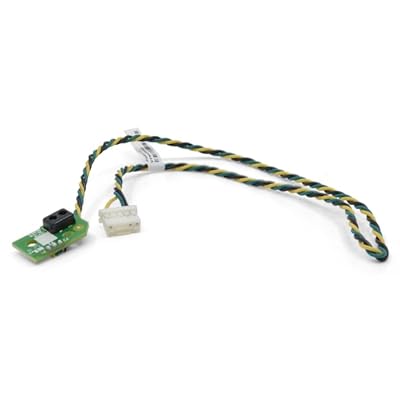
Ribbon Out Sensor for Zebra ZT510 Thermal Barcode Label Mobile Printer P1083347-015
Item #:
126561387
XCD 249
Price Details
Excluding Shipping & Custom charges ( Shipping and custom charges will be calculated on checkout )
*All items will import from US
0 ratings
Write a review
In stock
 Imported from USA store
QTY:
Order now and get it around Thursday, June 25
Secured transaction
Ubuy works hard to protect your security and privacy. Our advanced payment security system ensures confidentiality by encrypting your information during transmission using AES (Advanced Encryption Standards) and SSL (Secure Socket Layer) protocols. Your payment details are 100% secure as we do not share your payment details with third party sellers.
Our Top Logistics Partners


Our sensors have been tested many times by humans and machines, and their performance is guaranteed.

Fast
Shipping

Free
Return*

Secure Packaging

100% Original Products

PCI DSS Compliance

ISO 27001 Certified


Note: Step Down Voltage Transformer required for using electronics products of US store (110-120). Recommended power converters Buy Now.


What Stands Out
Precision Detection
The Ribbon Out Sensor ensures accurate detection of ribbon availability, preventing printing errors and enhancing workflow efficiency in environments that rely on consistent barcode label production.
Compatibility
Designed specifically for Zebra ZT510 printers, this sensor guarantees seamless integration and operability, reducing the need for additional adjustments or compatibility concerns during installation.
Durable Design
Constructed from high-quality materials, this Ribbon Out Sensor offers exceptional longevity and reliability, making it a cost-effective solution for businesses that prioritize long-term operational efficiency and minimal maintenance.
Product Details
| Item Weight | 0.25 lbs (110 grams) |
Who Should Buy?

-
Frequent Label Users
Ideal for users who regularly print labels, ensuring consistent quality and efficiency with the Zebra ZT510 printer.
-
Logistics Companies
Perfect for logistics firms needing accurate label printing for shipping and inventory management with minimal downtime.
-
Mobile Printing Needs
Suitable for businesses that require portable solutions, enhancing productivity with on-the-go labeling capabilities.

-
Occasional Label Printers
Not suitable for users who rarely print labels, as cost may not justify the purchase for infrequent use.
-
High Volume Settings
May not meet the demands of extremely high-volume printing operations that require continuous and robust performance.
-
Budget-Conscious Buyers
Not ideal for purchasers prioritizing low-cost options, as this product may carry a higher price point.
Product Description
Ribbon Out Sensor for Zebra ZT510 Thermal Barcode Label Mobile Printer P1083347-015
Have any Query? Chat with us
Customer Questions & Answers
-
Question:
What is a Ribbon Out Sensor and how does it work in the Zebra ZT510 printer?
Answer: The Ribbon Out Sensor is a critical component of the Zebra ZT510 Thermal Barcode Label Mobile Printer that detects when the ribbon has been used up or is running low. It works by sensing the presence or absence of the thermal transfer ribbon, ensuring uninterrupted label printing. This feature is especially useful in high-volume environments where maintaining printing accuracy is crucial. For example, if the sensor detects that the ribbon is out, it can pause the print job, preventing wasted materials and time, allowing the user to replace the ribbon promptly. -
Question:
How do I install the Ribbon Out Sensor in my Zebra ZT510 printer?
Answer: Installing the Ribbon Out Sensor in your Zebra ZT510 printer is a straightforward process. First, ensure that the printer is turned off. Then, access the printer's internal compartment where the sensor is located. Carefully remove the old sensor and replace it with the new one, ensuring that it is properly seated. After installation, turn on the printer and run a test print to ensure that the sensor is functioning correctly. This process is ideal for users who frequently switch out parts to ensure optimal printer performance. -
Question:
What can cause the Ribbon Out Sensor to malfunction?
Answer: Malfunctions of the Ribbon Out Sensor in the Zebra ZT510 can be attributed to several factors. Common issues include dirt or debris obstructing the sensor, physical damage to the sensor, or poor electrical connections. Regular maintenance and cleaning of the printer, as well as checking for loose wires, can help prevent these issues. As an example, if labels are printing incorrectly or if the printer pauses unexpectedly, inspecting the sensor would be a practical first step in troubleshooting the problem. -
Question:
Can I use third-party ribbons with my Zebra ZT510 printer while using the Ribbon Out Sensor?
Answer: Yes, you can use third-party ribbons with the Zebra ZT510 printer while utilizing the Ribbon Out Sensor. However, it is important to ensure that the ribbons meet the specifications required for optimal performance. Using compatible ribbons helps prevent sensor malfunctions and ensures high-quality print results. For instance, if you frequently print shipping labels, ensure that the ribbons are suitable for the material and the print environment. -
Question:
How do I troubleshoot if the Ribbon Out Sensor keeps triggering an error?
Answer: If the Ribbon Out Sensor in your Zebra ZT510 continuously triggers an error, begin by checking for any obstructive debris around the sensor. Cleaning the area may resolve the issue. Next, inspect the ribbon for proper installation and ensure that it is the correct type. If problems persist, it might indicate a faulty sensor that requires replacement. This troubleshooting approach can save time and improve printing efficiency. -
Question:
What types of applications are suitable for the Zebra ZT510 printer with the Ribbon Out Sensor?
Answer: The Zebra ZT510 printer equipped with a Ribbon Out Sensor is suitable for a variety of applications including logistics, retail, and manufacturing. For instance, businesses that require on-demand label printing for shipping or inventory management will benefit from the reliability of the sensor preventing interruptions. This functionality is essential for maintaining workflow efficiency in busy environments. -
Question:
Is the Ribbon Out Sensor specific to the Zebra ZT510 model?
Answer: Yes, the Ribbon Out Sensor is tailored specifically for the Zebra ZT510 model to ensure optimal compatibility and performance. While other Zebra printers may have similar sensors, they may differ in design and installation procedures. Using the correct sensor for your printer prevents operational issues and ensures that your label printing runs smoothly, especially in high-volume situations. -
Question:
How can I identify if my Ribbon Out Sensor needs replacement?
Answer: You can identify if your Ribbon Out Sensor needs replacement by observing frequent error messages related to ribbon status or if the printer fails to detect the presence of a ribbon even when properly installed. Additionally, if you notice inconsistent print quality, it might indicate sensor failure. Regularly monitoring your printer's performance and addressing issues promptly can enhance productivity. -
Question:
Where can I buy the Ribbon Out Sensor for Zebra ZT510 Thermal Barcode Label Mobile Printer P1083347-015 in Grenada?
Answer: You can purchase the Ribbon Out Sensor for the Zebra ZT510 Thermal Barcode Label Mobile Printer P1083347-015 at Ubuy in Grenada. Ubuy offers a variety of printer parts, including essential components like the Ribbon Out Sensor, ensuring you receive quality products for your printing needs. -
Question:
What maintenance tips can help prolong the life of my Zebra ZT510 printer's Ribbon Out Sensor?
Answer: To prolong the life of the Ribbon Out Sensor in your Zebra ZT510 printer, regular cleaning is essential. Ensure that dirt and debris are cleared from the sensor area to prevent obstruction. Additionally, routinely checking for loose connections can help maintain functionality. Implementing a maintenance schedule not only enhances the sensor's performance but also optimizes the overall printer life, ensuring reliable label printing over time.
Kaibintex Label Makers Editorial Review
No editorial reviews found
Customer Reviews & Ratings
1 customers ratings
-
5 Star
100%
-
4 Star
0%
-
3 Star
0%
-
2 Star
0%
-
1 Star
0%
Review this product
Share your thoughts with other customers
Product Price History
Important information
- Limitations : For products shipped internationally, please note that any manufacturer warranty may not be valid; manufacturer service options may not be available; product manuals, instructions, and safety warnings may not be in destination country languages; the products (and accompanying materials) may not be designed in accordance with destination country standards, specifications, and labeling requirements; and the products may not conform to destination country voltage and other electrical standards (requiring use of an adapter or converter if appropriate). The recipient is responsible for assuring that the product can be lawfully imported to the destination country. When ordering from Ubuy or its affiliates, the recipient is the importer of record and must comply with all laws and regulations of the destination country.
- Not all the products listed on Ubuy are for sale, as Ubuy is a global search engine. Products are subject to export/trade regulations.
XCD 249
Order now and get it around Thursday, June 25
This item is not restrict in my country.(Please click on above link if this item is not restrict in your country, So our team will review and allow.)
QTY:
Secured transaction
Ubuy works hard to protect your security and privacy. Our advanced payment security system ensures confidentiality by encrypting your information during transmission using AES (Advanced Encryption Standards) and SSL (Secure Socket Layer) protocols. Your payment details are 100% secure as we do not share your payment details with third party sellers.
Our Top Logistics Partners
Fastest cross-border delivery
Features & Benefits
- Highly compatible and flexible ribbon out sensor for Zebra ZT510 printer.
- Exquisitely designed packaging ensures safe delivery.
- Extensively tested for reliability by experts and machines.
- Guaranteed stable and reliable print output quality.
- Improved design enhances printing effects and quality.
- Essential for optimal printer performance.