0 ratings

Item #:
149820928
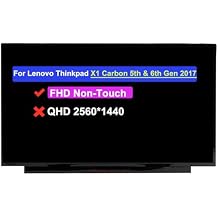
14.0" Screen Replacement for Lenovo ThinkPad X1 Carbon 5th & 6th Gen 2017 20HR, 20HQ 20K4, 20K3 20KH, 20KG 00NY435 B140HAN03.1 LCD Non-Touch Display
Item #:
149820928
XCD 316
Price Details
Excluding Shipping & Custom charges ( Shipping and custom charges will be calculated on checkout )
*All items will import from US
0 ratings
Write a review
In stock
 Imported from USA store
QTY:
Order now and get it around Saturday, June 27
Secured transaction
Ubuy works hard to protect your security and privacy. Our advanced payment security system ensures confidentiality by encrypting your information during transmission using AES (Advanced Encryption Standards) and SSL (Secure Socket Layer) protocols. Your payment details are 100% secure as we do not share your payment details with third party sellers.
Our Top Logistics Partners


If you are not sure whether it is the correct item you need, please contact us with specific model and pictures of your original screen.

Fast
Shipping

Free
Return*

Secure Packaging

100% Original Products

PCI DSS Compliance

ISO 27001 Certified


Note: Step Down Voltage Transformer required for using electronics products of US store (110-120). Recommended power converters Buy Now.


What Stands Out
High-Definition Display
Enjoy crisp visuals with a Full HD 1920x1080 resolution, enhancing your productivity and media consumption on the Lenovo ThinkPad X1 Carbon.
Precise Compatibility
Specifically designed for Lenovo ThinkPad X1 Carbon 5th & 6th Gen models, ensuring an exact fit and effortless installation without compatibility issues.
Durable Quality
Constructed to meet rigorous standards, this LCD panel promises longevity and reliability, reducing the need for frequent replacements and saving you money.
Product Details
| Item Weight | 2 lbs (910 grams) |
Who Should Buy?

-
Business Professionals
Ideal for business users who require a reliable and high-quality screen for everyday work tasks.
-
Students
Perfect for students who need to replace a damaged screen for online classes and learning resources.
-
Tech Savvy Users
Great for tech enthusiasts comfortable with DIY repairs and looking to upgrade their laptop's screen quality.

-
Casual Users
Not suitable for casual users who rarely perform repairs and prefer ready-made solutions for their devices.
-
Non-Tech Savvy
Inappropriate for users lacking technical skills who may struggle with installation or repairs.
-
Gaming Enthusiasts
Not ideal for gamers needing high refresh rates or advanced graphics capabilities which this panel doesn't offer.
Product Description
14.0" Screen Replacement for Lenovo ThinkPad X1 Carbon 5th & 6th Gen 2017 20HR, 20HQ 20K4, 20K3 20KH, 20KG 00NY435 B140HAN03.1 LCD Non-Touch Display Panel (FHD 1920 * 1080 30Pins)
Have any Query? Chat with us
Customer Questions & Answers
-
Question:
What is the compatibility of the Lenovo ThinkPad X1 Carbon 14.0 Screen Replacement?
Answer: The 14.0 Screen Replacement is compatible with Lenovo ThinkPad X1 Carbon models 5th and 6th generations, specifically the 2017 versions identified by model numbers 20HR, 20HQ, 20K4, 20K3, 20KH, and 20KG. This ensures a proper fit and functionality, as it’s designed to match the original specifications closely. If you own any of these models and require a replacement due to damage or malfunction, this screen will serve as a perfect solution, restoring your device's functionality and display quality. -
Question:
Is this Lenovo ThinkPad X1 Carbon screen replacement a non-touch display?
Answer: Yes, this screen replacement is a non-touch LCD display. It is designed specifically for the ThinkPad X1 Carbon models that do not support touch functionality. Non-touch screens are generally more durable and less prone to issues related to touch sensitivity, making them suitable for users who rely on keyboard input without the need for touch interaction. This can be particularly beneficial in business settings where durability and longevity are crucial factors in device selection. -
Question:
How do I install the 14.0 Screen Replacement for Lenovo ThinkPad X1 Carbon?
Answer: Installing the 14.0 Screen Replacement involves several steps, including removing the existing screen, disconnecting the display cables, and securing the new screen in place. To ensure a smooth installation, it is advisable to follow a detailed guide or video tutorial specific to your model. Proper tools such as a screwdriver set and plastic prying tools will be necessary to avoid damaging your laptop during the process. If you’re not comfortable with self-installation, seeking professional assistance can help ensure optimal results. -
Question:
What should I do if the new screen does not function correctly after installation?
Answer: If the new screen does not function correctly after installation, first check the connections to ensure that all cables are securely attached. Sometimes, a loose connection can cause display issues. If everything appears connected correctly, conduct a power cycle of your laptop by removing the battery and power source for a few minutes before reconnecting it. If problems persist, re-evaluating your installation steps or consulting a professional technician may be necessary to diagnose any underlying issues. -
Question:
Can I replace the screen myself or should I hire a professional?
Answer: You can replace the screen yourself if you are comfortable with minor laptop repairs and possess the right tools and resources. Many users successfully undertake this task by following step-by-step tutorials available online. However, if you lack experience or are hesitant about damaging your device, hiring a professional technician is recommended. This approach can save you time and ensure that the installation is done correctly, minimizing the risk of further issues. -
Question:
What tools do I need to replace the screen on my Lenovo ThinkPad X1 Carbon?
Answer: To replace the screen on your Lenovo ThinkPad X1 Carbon, you will need a set of precision screwdrivers, plastic prying tools, and possibly a suction cup for easier screen removal. Additionally, having an anti-static wrist strap can help prevent any electrostatic discharge damage. Using these tools will facilitate a safe and efficient replacement process, allowing you to handle delicate components with care and avoid any accidental damage. -
Question:
Are there specific instructions for calibrating the new screen after installation?
Answer: Typically, there is no need for specific calibration for a new screen installation, as the display settings should automatically adapt. However, adjusting brightness, contrast, and color settings according to your preference after installation can enhance your viewing experience. If you notice any display issues or inaccuracies in colors, software tools may be available to help fine-tune these settings. Check for any display-related software that comes pre-installed on your ThinkPad to assist with adjustments. -
Question:
How can I tell if my screen needs to be replaced?
Answer: You may need to replace your screen if you notice persistent issues such as cracks, dead pixels, discoloration, or flickering. Physical damage to the screen, including impact marks or visible distortion, also indicates the need for replacement. Addressing these issues promptly can prevent further damage and ensure the functionality of your device. If you experience such problems regularly, it's advisable to consider a screen replacement to restore your laptop's performance. -
Question:
Where can I buy the 14.0 Screen Replacement for Lenovo ThinkPad X1 Carbon in Grenada?
Answer: You can buy the 14.0 Screen Replacement for Lenovo ThinkPad X1 Carbon from Ubuy in Grenada. Ubuy offers a wide selection of computer parts, including high-quality screen replacements tailored for various Lenovo models. Purchasing from Ubuy ensures you are getting reliable products along with potentially beneficial customer service, helping you make an informed choice for your repair needs.
WARWOLFTEAM Replacement Screens Editorial Review
No editorial reviews found
Customer Reviews & Ratings
1 customers ratings
-
5 Star
100%
-
4 Star
0%
-
3 Star
0%
-
2 Star
0%
-
1 Star
0%
Review this product
Share your thoughts with other customers
Product Price History
Important information
- Limitations : For products shipped internationally, please note that any manufacturer warranty may not be valid; manufacturer service options may not be available; product manuals, instructions, and safety warnings may not be in destination country languages; the products (and accompanying materials) may not be designed in accordance with destination country standards, specifications, and labeling requirements; and the products may not conform to destination country voltage and other electrical standards (requiring use of an adapter or converter if appropriate). The recipient is responsible for assuring that the product can be lawfully imported to the destination country. When ordering from Ubuy or its affiliates, the recipient is the importer of record and must comply with all laws and regulations of the destination country.
- Not all the products listed on Ubuy are for sale, as Ubuy is a global search engine. Products are subject to export/trade regulations.
XCD 316
Order now and get it around Saturday, June 27
This item is not restrict in my country.(Please click on above link if this item is not restrict in your country, So our team will review and allow.)
QTY:
Secured transaction
Ubuy works hard to protect your security and privacy. Our advanced payment security system ensures confidentiality by encrypting your information during transmission using AES (Advanced Encryption Standards) and SSL (Secure Socket Layer) protocols. Your payment details are 100% secure as we do not share your payment details with third party sellers.
Our Top Logistics Partners
Fastest cross-border delivery
Features & Benefits
- Ensure compatibility by checking your model and resolution before purchase.
- Professional installation is recommended; no instructions included.
- Package includes LCD Screen only—laptop not included.
- Contact us for technical support if the replacement screen does not work.
- If purchased incorrectly, keep the packaging intact for a full refund.
- We prioritize customer satisfaction and respond to inquiries within 24 hours.