- Home Page /
- Electronics /
- Home Audio /
- Home Audio Accessories /
- Cables /
- Power Cords /
- COMeap Mini 6 Pin to 8 Pin 62 PCI Express Vid...
0 ratings

Item #:
27104064
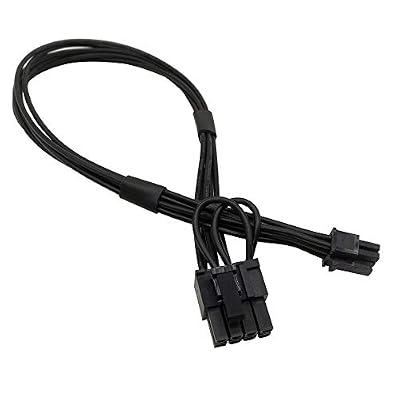
COMeap Mini 6 Pin to 8 Pin 62 PCI Express Video Card Power Adapter Cable for Mac Pro TowerPower Mac G5 14-inch35cm Pack of 2
Item #:
27104064
XCD 48
Price Details
Excluding Shipping & Custom charges ( Shipping and custom charges will be calculated on checkout )
*All items will import from US
0 ratings
Write a review
In stock
 Imported from USA store
QTY:
Order now and get it around Sunday, July 05
Secured transaction
Ubuy works hard to protect your security and privacy. Our advanced payment security system ensures confidentiality by encrypting your information during transmission using AES (Advanced Encryption Standards) and SSL (Secure Socket Layer) protocols. Your payment details are 100% secure as we do not share your payment details with third party sellers.
Our Top Logistics Partners


Connect a PCIe video graphics card with 8 pin or 6 pin port to Apple motherboard with mini 6 pin port

Fast
Shipping

Free
Return*

Secure Packaging

100% Original Products

PCI DSS Compliance

ISO 27001 Certified


Note: Step Down Voltage Transformer required for using electronics products of US store (110-120). Recommended power converters Buy Now.


What Stands Out
Versatile Compatibility
Designed specifically for Mac Pro Tower and Power Mac G5, ensuring seamless integration and reliable performance with various PCI Express video cards.
Sturdy Construction
Constructed with high-quality materials for durability and longevity, providing a stable power supply to support demanding graphics requirements without the risk of power failure.
Compact Design
The 14-inch (35cm) length offers flexibility for neat cable management, helping to maintain an organized environment while ensuring optimal airflow in your system.
Product Details
| Item Weight | 0.2 lbs (90 grams) |
Who Should Buy?

-
Mac Pro Users
Ideal for those upgrading graphics cards in Mac Pro Tower for improved performance and compatibility.
-
Power User Gamers
Great for gamers needing additional power connections for high-performance GPUs in their Mac systems.
-
DIY PC Builders
Perfect for custom builds requiring specific cable lengths and connectors for a clean and organized setup.

-
Non-Mac Users
Users with non-Mac systems won't be able to utilize this product effectively due to compatibility issues.
-
Low Power GPUs
Gamers using low-end graphics cards that don’t require extra power connectors would find this unnecessary.
-
Other Devices
Not suitable for devices like laptops or compact PCs that do not require PCI Express power adapters.
Product Description
COMeap Mini 6 Pin to 8 Pin 62 PCI Express Video Card Power Adapter Cable for Mac Pro TowerPower Mac G5 14-inch35cm Pack of 2
Have any Query? Chat with us
Customer Questions & Answers
-
Question:
What is the purpose of the COMeap Mini 6 Pin to 8 Pin PCI Express Video Card Power Adapter Cable?
Answer: The COMeap Mini 6 Pin to 8 Pin PCI Express Video Card Power Adapter Cable is designed to provide power to high-performance graphics cards in Mac Pro systems. This adapter facilitates compatibility between older Mac Power systems and newer graphics cards that require an 8-pin power connector. By using this adapter, users can upgrade their Mac systems without needing to replace the entire machine, making it a cost-effective solution for enhancing visual performance and gaming capabilities. -
Question:
Is this adapter compatible with all Mac Power systems?
Answer: This adapter is specifically tailored for Mac Pro and Power Mac G5 systems. It connects a 6-pin power supply connector to an 8-pin graphics card connector, making it ideal for users who wish to upgrade their graphics without changing their entire setup. Before purchasing, always check your system specifications to ensure compatibility, as it primarily suits configurations that support these specific power connections. -
Question:
What is the length of the COMeap adapter cable?
Answer: The COMeap Mini 6 Pin to 8 Pin adapter cable is 35cm long, providing ample length for flexible installations within your Mac Pro or Power Mac G5. This length allows for convenient positioning of the graphics card within the tower, ensuring that the cable management remains tidy and efficient. Proper length is crucial for fitting into tight spaces or for minimizing cable clutter in your setup. -
Question:
How many adapters are included in the pack?
Answer: Each pack of the COMeap Mini 6 Pin to 8 Pin PCI Express Video Card Power Adapter Cable contains two adapters. This is ideal for users who may need to upgrade multiple graphics cards in their systems or as a backup in case of future needs. With two adapters, you have flexibility in maximizing your hardware potential across multiple setups or installations. -
Question:
What types of graphics cards can I use with this adapter?
Answer: The COMeap adapter is compatible with various modern graphics cards that require an 8-pin power connector, including popular models from NVIDIA and AMD. If you have a Mac Pro or Power Mac G5 and wish to upgrade to a high-performance graphics solution, this adapter allows you to easily connect these cards. Always check the power requirements of the specific graphics card you plan to use to ensure compatibility and optimal performance. -
Question:
Can this adapter support high-performance gaming?
Answer: Yes, the COMeap Mini 6 Pin to 8 Pin adapter cable is capable of supporting high-performance gaming and graphical tasks when used with compatible graphics cards. The ability to connect newer graphics technologies to older Mac systems enhances your gaming experience, allowing for better frame rates and improved graphics quality. This makes it an essential component for gaming enthusiasts looking to get the most out of their existing setups. -
Question:
How do I install the COMeap adapter?
Answer: Installing the COMeap adapter is a straightforward process. First, power down your Mac Pro or Power Mac G5 and open the case. Locate the 6-pin power connector from your power supply and connect it to the 6-pin side of the adapter. Then connect the other end (8-pin) to your graphics card. Ensure all connections are secure before replacing the case cover and powering your system back on. This installation method allows you to quickly enhance your graphics capabilities. -
Question:
Does this adapter provide any visual quality enhancements?
Answer: While the COMeap Mini 6 Pin to 8 Pin adapter itself does not enhance visual quality directly, it enables the use of modern graphics cards that support higher resolutions and better rendering capabilities. By allowing older systems to utilize newer technology, users can experience improved visuals in gaming and graphics-intensive applications. Thus, the adapter indirectly facilitates enhanced visual quality when paired with compatible hardware. -
Question:
What should I do if my graphics card does not power up with the adapter?
Answer: If your graphics card does not power up after using the COMeap adapter, first check all connections to ensure they are secure and properly installed. Confirm that the graphics card is correctly seated in its slot and that your power supply is functioning properly. Additionally, refer to your graphics card's power requirements to verify compatibility. If issues persist, testing the card in another compatible system can help isolate the problem. -
Question:
Where can I buy the COMeap Mini 6 Pin to 8 Pin PCI Express Video Card Power Adapter Cable?
Answer: You can purchase the COMeap Mini 6 Pin to 8 Pin PCI Express Video Card Power Adapter Cable on Ubuy in Grenada. Ubuy offers a wide selection of computer accessories, ensuring that you find the right components for your needs along with customer support and easy navigation to enhance your shopping experience.
COMeap Power Cords Editorial Review
No editorial reviews found
Customer Reviews & Ratings
1 customers ratings
-
5 Star
100%
-
4 Star
0%
-
3 Star
0%
-
2 Star
0%
-
1 Star
0%
Review this product
Share your thoughts with other customers
Product Price History
Important information
- Limitations : For products shipped internationally, please note that any manufacturer warranty may not be valid; manufacturer service options may not be available; product manuals, instructions, and safety warnings may not be in destination country languages; the products (and accompanying materials) may not be designed in accordance with destination country standards, specifications, and labeling requirements; and the products may not conform to destination country voltage and other electrical standards (requiring use of an adapter or converter if appropriate). The recipient is responsible for assuring that the product can be lawfully imported to the destination country. When ordering from Ubuy or its affiliates, the recipient is the importer of record and must comply with all laws and regulations of the destination country.
- Not all the products listed on Ubuy are for sale, as Ubuy is a global search engine. Products are subject to export/trade regulations.
XCD 48
Order now and get it around Sunday, July 05
This item is not restrict in my country.(Please click on above link if this item is not restrict in your country, So our team will review and allow.)
QTY:
Secured transaction
Ubuy works hard to protect your security and privacy. Our advanced payment security system ensures confidentiality by encrypting your information during transmission using AES (Advanced Encryption Standards) and SSL (Secure Socket Layer) protocols. Your payment details are 100% secure as we do not share your payment details with third party sellers.
Our Top Logistics Partners
Fastest cross-border delivery
Features & Benefits
- Mini 6 pin to 8 Pin (6+2) PCI-e cable for Mac Pro models as listed
- One end is Mini 6 pin male, another end is 8 pin(6+2) standard PCIe male
- Connector A: mini 6 pin PCIe male, Connector B: 8 pin (6+2) PCIe male
- Length: 14-inch(35cm), Rated power: 300W, Quantity: 2pcs
- Do not connect to other incompatible motherboards; it will damage the motherboards or graphics card
- Contact us if unsure