- Home Page /
- Electronics /
- Computer Accessories /
- Tablet Replacement Parts /
- Screens /
- for Samsung Galaxy Tab S9 FE Screen Replaceme...
0 ratings






Item #:
201547163
for Samsung Galaxy Tab S9 FE Screen Replacement for Samsung Tab S9 FE LCD Display X510B SM-X510 LCD Digitizer Screen Touch Assembly Repair Parts
Item #:
201547163
XCD 160
Price Details
Excluding Shipping & Custom charges ( Shipping and custom charges will be calculated on checkout )
*All items will import from US
10%
0 ratings
Write a review
In stock
 Imported from USA store
QTY:
Only 11 items left in stock.
Order now and get it around Monday, July 06
Secured transaction
Ubuy works hard to protect your security and privacy. Our advanced payment security system ensures confidentiality by encrypting your information during transmission using AES (Advanced Encryption Standards) and SSL (Secure Socket Layer) protocols. Your payment details are 100% secure as we do not share your payment details with third party sellers.
Our Top Logistics Partners


Experience high-quality visuals with our perfect quality screen replacement for the Samsung Tab S9 FE!

Fast
Shipping

Free
Return*

Secure Packaging

100% Original Products

PCI DSS Compliance

ISO 27001 Certified


Note: Step Down Voltage Transformer required for using electronics products of US store (110-120). Recommended power converters Buy Now.


What Stands Out
High-Quality Display
The Samsung Galaxy Tab S9 FE screen replacement provides vibrant colors and sharp visuals, ensuring a premium viewing experience, comparable to the original LCD display.
Easy Installation
Designed for hassle-free repairs, this touch assembly simplifies the replacement process, making it accessible for both DIY enthusiasts and professional technicians alike.
Durable Materials
Crafted from high-quality materials, the screen replacement is built to last, offering exceptional durability that withstands everyday use and protects against wear and tear.
Product Details
- ➤【Parameters】For Samsung Tab S9 FE screen replacement, 10.9 inches, 1440x2304 pixels, please confirm your phone model before purchasing.
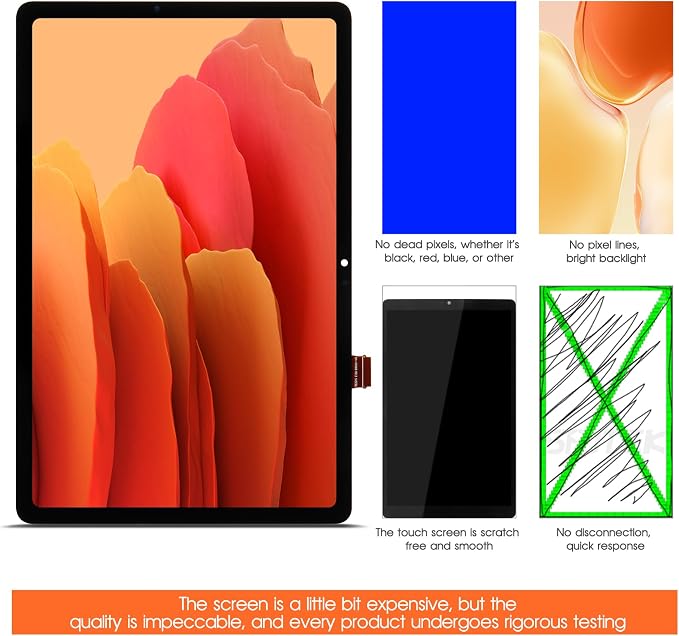
- ➤【Quality Control】All for SM-X510 screen replacement are strictly QC tested before shipment, 100% intact. Make sure for SM-X510 lcd replacement are no scratches, no dead zones, no dot pixels or lines on the screen. High color saturation, high resolution, wide color gamut and smooth hand feel.
- ➤【Perfect Quality Screen】For The samsung tab S9 FE SM-X510b lcd display has high brightness, high pixel, bringing you a clearer and more colorful screen world, and enjoy the original visual experience.
- ➤【Application】Used to replace the defective LCD display touch screen digitizer assembly for Tab S9 FE. Examples include incorrect screen response, display issues, pixel distortion, cracked LCD screen, wrong colors, old or frozen LCD.
- ➤【Installation and Service】 Please test the Screen Replacement for Samsung Galaxy Tab S9 FE before installation to ensure the normal use of the SM-X510 lcd. Non-professional installation is not recommended. If you need help and screen replacement for samsung S9 FE SM-X510 lcd Installation instructions video, You can ask us for help, or find the installation video on YouTube.You can also go to the local repair shop and have a professional replace the screen for you.
| Package Dimensions | 11.89 x 8.58 x 1.46 inches (30.2 x 21.8 x 3.7 cm) |
| Item Weight | 14 ounces (396.9 grams) |
| Manufacturer | AGCUT |
| Item model number | SM-X510 |
| Date First Available | October 22, 2025 |
What's in the box
SM-X510
Who Should Buy?

-
DIY Repair Enthusiasts
Individuals comfortable with electronics can easily replace their device screen, saving on repair costs and time.
-
Cost-Conscious Users
Budget-friendly option for those looking to restore their Galaxy Tab S9 FE without buying a new device.
-
Tech Professionals
Technicians seeking reliable replacement parts for efficient repairs can benefit from this high-quality screen assembly.

-
Non-Tech Savvy Users
Users unfamiliar with hardware repair might struggle with installation and potentially damage their device further.
-
Warranty Holders
Replacing the screen may void existing warranties, risking support options and future repairs from the manufacturer.
-
Time-Limited Individuals
Those unable to invest time in repair processes should consider professional services instead of DIY solutions.
Product Description
Have any Query? Chat with us
Customer Questions & Answers
-
Question:
What is included in the package?
Answer: The package includes 1x LCD screen replacement, a set of special disassembly tools, double-sided adhesive tape, a dust removal sticker, and a tempered film. -
Question:
How do I ensure proper installation?
Answer: It's crucial to test the screen before installation and to avoid bending the cable. If you're inexperienced, professional installation is recommended. -
Question:
What should I do if my device shows a black screen after installation?
Answer: Press and hold the power and volume keys simultaneously. If the device vibrates, the mainline may not be installed properly; reinstall the product.
AGCUT Screens SM-X510 Editorial Review
No editorial reviews found
Customer Reviews & Ratings
1 customers ratings
-
5 Star
0%
-
4 Star
0%
-
3 Star
0%
-
2 Star
0%
-
1 Star
100%
Review this product
Share your thoughts with other customers
Product Price History
Important information
- Limitations : For products shipped internationally, please note that any manufacturer warranty may not be valid; manufacturer service options may not be available; product manuals, instructions, and safety warnings may not be in destination country languages; the products (and accompanying materials) may not be designed in accordance with destination country standards, specifications, and labeling requirements; and the products may not conform to destination country voltage and other electrical standards (requiring use of an adapter or converter if appropriate). The recipient is responsible for assuring that the product can be lawfully imported to the destination country. When ordering from Ubuy or its affiliates, the recipient is the importer of record and must comply with all laws and regulations of the destination country.
- Not all the products listed on Ubuy are for sale, as Ubuy is a global search engine. Products are subject to export/trade regulations.
XCD 160
Order now and get it around Monday, July 06
This item is not restrict in my country.(Please click on above link if this item is not restrict in your country, So our team will review and allow.)
QTY:
Only 11 items left in stock.
Secured transaction
Ubuy works hard to protect your security and privacy. Our advanced payment security system ensures confidentiality by encrypting your information during transmission using AES (Advanced Encryption Standards) and SSL (Secure Socket Layer) protocols. Your payment details are 100% secure as we do not share your payment details with third party sellers.
Our Top Logistics Partners
Fastest cross-border delivery
Features & Benefits
- High-quality touch screen digitizer replacement for Samsung Galaxy Tab S9 FE.
- 10.9-inch size with a resolution of 1440x2304 pixels for stunning visuals.
- QC tested for 100% integrity; no scratches, dead zones, or pixel issues.
- Includes all necessary installation tools and accessories for easy replacement.
- Highly recommended for replacing defective displays and restoring screen functionality.
- Professional installation is advised; assistance available through videos or repair services.